
DocuWriter.ai Review 2026 - AI Code Docs
Verified Jun 10, 2026 by Tooliverse Editorial
DocuWriter.ai turns source code into complete technical documentation in minutes—API references, UML diagrams, and architecture docs without manual writing. Trusted by 30,000+ developers at MIT, NVIDIA, and Verizon for keeping docs synchronized with code changes.
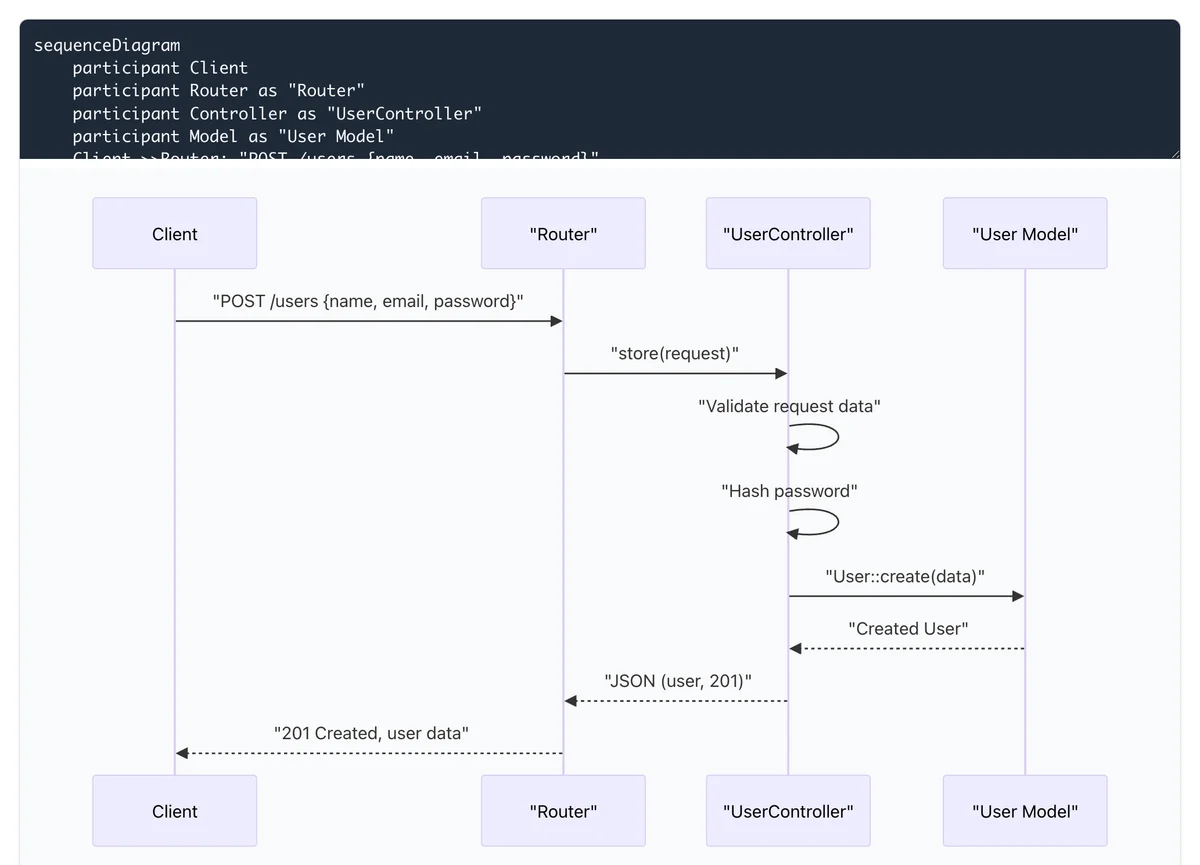
Automatically generate complex sequence diagrams from text.
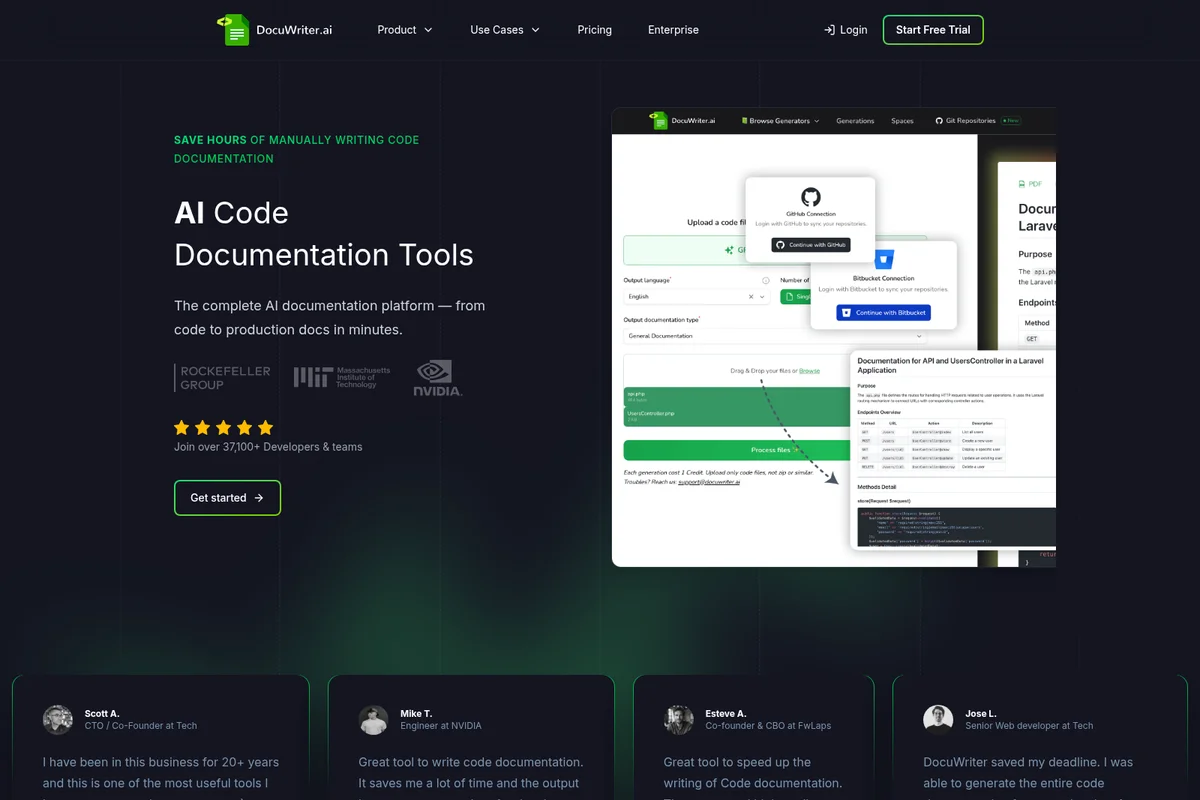
Generate comprehensive code documentation from your codebase in minutes.

Ensure documentation security and seamlessly integrate with your existing development workflow.
DocuWriter.ai Review: Tooliverse Consensus


Based on 35 verified reviews across 3 platforms,
combined with Tooliverse's expert analysis
DocuWriter.ai transforms source code into comprehensive technical documentation automatically, eliminating the manual writing work that typically takes months. The platform excels at generating API references, process diagrams, and UML visualizations that clarify complex systems for both technical and non-technical stakeholders, with the Autopilot AI Agent keeping documentation synchronized as code evolves. The VSCode integration and support for over 20 programming languages make it a natural fit for polyglot engineering teams, though the AI requires manual refinement for highly custom business logic and proprietary libraries.
Bottom line: A leading documentation platform that turns undocumented codebases into comprehensive technical references in weeks instead of months, though complex domain logic still needs human review and refinement.
DocuWriter.ai | Key Specs
- Platforms
- Web, API
- Pricing Model
- Freemium ($0-199/mo) See plans
- Privacy/Data Use
- Code never stored, no training on user data
- Security
- Role-based access, audit logs, data export/deletion See details
Wins
- •Automates tedious API documentation tasks with high accuracy and professional outputmentioned in 18 reviews
- •Generates detailed process diagrams that clarify complex application logic for stakeholdersmentioned in 15 reviews
- •Integrates directly into developer workflows via a lightweight VSCode extensionmentioned in 12 reviews
Watch-Outs
- •Requires manual fine-tuning for complex logic or proprietary internal librariesmentioned in 7 reviews
- •Pricing model may feel steep for solo developers or very small teamsmentioned in 6 reviews
- •Occasional logic flow errors in generated tests that require human oversightmentioned in 5 reviews
DocuWriter.ai Features 2026
AI Code Documentation Generator
Automatically generates comprehensive documentation from source code across 20+ programming languages including Python, JavaScript, TypeScript, Java, C#, Go, Ruby, PHP, Rust, Swift, and Kotlin. Analyzes codebase structure, functions, classes, and relationships to create detailed technical references.
Autopilot AI Agent
Monitors Git repositories for code changes and automatically generates documentation update suggestions. Keeps documentation synchronized with codebase to prevent staleness. Detects drift and opens reviewable suggestions for team approval.
API Documentation Generator
Auto-generates Swagger/OpenAPI-compliant API documentation from code. Creates endpoint references, parameter specifications, and response schemas directly from API implementations without manual writing.
MCP Server Integration
Every Knowledge Space becomes an MCP (Model Context Protocol) server, allowing AI assistants like Cursor, Claude, and ChatGPT to read documentation natively. Enables seamless integration with developer workflows.
DocuWriter.ai User Reviews
Selected Reviews
"DocuWriter.ai is one of the best in Writing. The community ratings don't lie. Personally tested and it delivers without hidden paywalls."
"The VSCode extension provides an interface to the API, enabling you to generate these assets directly from your editor. Very smooth."
"I've honestly been surprised with how useful I've found them as a solo dev on weekend projects where I don't have other engineers."
More from the Community
"It saves me a lot of time, and the output is very accurate and professional. The Git Documentation generator is a game changer."
"The Git Documentation generator gave a process diagram of how the web app calls in. That feature alone would save many hours."
"A handy AI for code documentation but still needs some fine tuning. It saves time but isn't a total replacement for manual review."
"Amazing and Best Code Documentation Platform. My code documentation has reduced from months to days with ease and simplicity."
"The biggest advantage with the platform is customer support. The team is very helpful and helps you solve problems fast."
"It saves me a lot of time, and the output is very accurate and professional. The Git Documentation generator is a game changer."
"The Git Documentation generator gave a process diagram of how the web app calls in. That feature alone would save many hours."
"A handy AI for code documentation but still needs some fine tuning. It saves time but isn't a total replacement for manual review."
"Amazing and Best Code Documentation Platform. My code documentation has reduced from months to days with ease and simplicity."
"The biggest advantage with the platform is customer support. The team is very helpful and helps you solve problems fast."
"It's helpful, but I've had AI ping me on a few things that are logic flow, usually last minute dumb things I added."
"Generic solutions will never really be any good and you need to customise toward what matters to you. It's an expensive linter for some."
"The automated documentation generation is a massive win for our internal team handovers. It keeps everyone on the same page."
"Solid performance. It's become a staple in my pipeline for auto-generating docs before every major release."
"It's helpful, but I've had AI ping me on a few things that are logic flow, usually last minute dumb things I added."
"Generic solutions will never really be any good and you need to customise toward what matters to you. It's an expensive linter for some."
"The automated documentation generation is a massive win for our internal team handovers. It keeps everyone on the same page."
"Solid performance. It's become a staple in my pipeline for auto-generating docs before every major release."
DocuWriter.ai Pricing 2026
View SourceProfessional at $33/month gets you 200 AI generations and 5 Knowledge Spaces—enough for small teams maintaining a handful of active projects. Enterprise at $86/month is where most engineering teams land: 500 generations, unlimited spaces, and the Autopilot AI Agent that keeps docs synchronized with code changes automatically. That automation is the difference between documentation that helps and documentation that rots. Unlimited at $199/month makes sense only if you're generating docs constantly across dozens of repositories; most teams hit diminishing returns before they need it.
DocuWriter.ai In-Depth Review 2026

This AI documentation platform connects to your Git repositories and generates complete technical documentation from source code across over 20 programming languages. It runs on GitHub, GitLab, Bitbucket, and Azure DevOps, including self-hosted instances, and outputs everything from API references to UML diagrams. The Autopilot AI Agent monitors for code changes and keeps docs synchronized automatically, solving the staleness problem that makes most documentation worthless within months.
What It's Like Day-to-Day
The workflow is straightforward: connect a repository, select what you need documented, and the AI analyzes your codebase structure to generate comprehensive references. What sets it apart is the depth—it doesn't just extract function signatures and call it done. The platform generates process diagrams that map how your application actually works, the kind of visual documentation that turns a confusing legacy system into something a new hire can understand in an afternoon. As one G2 reviewer noted, the Git Documentation generator "gave a process diagram of how the web app calls in" that would "save many hours" of manual diagramming and explanation.
DocuWriter.ai Security & Compliance
Security Features
- Code never stored - processed in memory only
- Role-based access controls
- Audit trail of changes and access
Privacy Commitments
- Code never stored or persisted to disk after generation
- No training on user code or documentation
- Data export and deletion available on request
- Private by default - all repositories and docs are private unless shared
DocuWriter.ai: Frequently Asked Questions (FAQs)
Do you support private repositories?
Yes. Repositories and generated documentation are private by default with granular permissions. You control who can view, edit, or admin each Knowledge Space.
Which languages and frameworks are supported?
DocuWriter.ai supports all major programming languages including TypeScript, JavaScript, Python, Go, Java, PHP, Ruby, C#, Rust, Swift, and Kotlin. The AI understands framework-specific patterns for React, Laravel, Django, Spring Boot, and others. If your code compiles, DocuWriter.ai can document it.
Can I import existing docs (Markdown, README, Confluence)?
Yes. You can import existing Markdown documentation files directly. For Confluence imports, contact the DocuWriter.ai team for assistance with migration.
Do you have a free trial?
Yes, DocuWriter.ai offers a 7-day free trial with no credit card required. You can test all core features and upgrade as your team grows.
DocuWriter.ai Integrations
| GitHub | GitLab | Bitbucket |
| Azure DevOps | n8n | Confluence |
| Zapier | Cursor | Claude |
| ChatGPT |
DocuWriter.ai: Verified Data Sheet
| # | Label | Data Point |
|---|---|---|
| [1] | DocuWriter.ai Consensus: 9.14/10 | DocuWriter.ai is one of the highest-rated AI coding tools in the Tooliverse index, with a consensus score of 9.14/10 across 35 verified reviews. |
| [2] | What is DocuWriter.ai | DocuWriter.ai, operated by DocuWriter, Inc., is an AI-powered documentation platform that generates technical documentation from source code. Trusted by 30,000+ developers at MIT, NVIDIA, and Verizon, it supports 20+ programming languages with pricing starting at $33/month. |
| [3] | Tooliverse Consensus on DocuWriter.ai | DocuWriter.ai transforms source code into comprehensive technical documentation automatically, eliminating the manual writing work that typically takes months. The platform excels at generating API references, process diagrams, and UML visualizations that clarify complex systems for both technical and non-technical stakeholders, with the Autopilot AI Agent keeping documentation synchronized as code evolves. The VSCode integration and support for over 20 programming languages make it a natural fit for polyglot engineering teams, though the AI requires manual refinement for highly custom business logic and proprietary libraries. |
| [4] | DocuWriter.ai Verdict | DocuWriter.ai bottom line: A leading documentation platform that turns undocumented codebases into comprehensive technical references in weeks instead of months, though complex domain logic still needs human review and refinement. |
| [5] | Free Trial: Free | DocuWriter.ai offers a Free Trial tier with 7-day access and limited AI generations, allowing teams to test core features at no cost. |
| [6] | Automates API docs with high accuracy | DocuWriter.ai automates API documentation generation with high accuracy and professional output quality, eliminating manual writing work validated by 18 user reviews as a core strength. |
| [7] | Process diagrams clarify complex logic | DocuWriter.ai generates detailed process diagrams and UML visualizations that clarify complex application logic for technical and non-technical stakeholders, cited as transformative by 15 user reviews. |
| [8] | VSCode extension for in-editor docs | DocuWriter.ai integrates directly into developer workflows via a lightweight VSCode extension that enables documentation generation from within the code editor, validated by 12 user reviews. |
| [9] | Professional: $33/mo (annual) | DocuWriter, Inc.'s DocuWriter.ai Professional empowers users with 200 AI Generations per month for $33/month billed annually, significantly expanding on the free tier's capabilities. |
| [10] | Exceptional support with fast response | DocuWriter.ai provides exceptional customer support with fast response times for technical issues and implementation guidance, recognized as a standout strength by 10 user reviews. |
| [11] | Needs tuning for complex custom logic | DocuWriter.ai requires manual fine-tuning for complex business logic or proprietary internal libraries where AI-generated documentation may miss domain-specific context, reported by 7 user reviews. |
| [12] | Pricing steep for solo developers | DocuWriter.ai pricing starting at $33/month may feel steep for solo developers or very small teams working on side projects, according to 6 user reviews. |
| [13] | Privacy: Code never stored or persisted to disk after generation | DocuWriter.ai privacy protections include Code never stored or persisted to disk after generation, No training on user code or documentation, and Data export and deletion available on request. |
| [14] | Enterprise: Code never stored - processed in memory only | DocuWriter.ai provides enterprise security with Code never stored - processed in memory only, Role-based access controls, and Audit trail of changes and access. |
| [15] | Accurate, professional, game-changing | DocuWriter.ai "saves me a lot of time, and the output is very accurate and professional" with the Git Documentation generator described as "a game changer" by a verified G2 reviewer. |
Best DocuWriter.ai Alternatives

Mintlify
Build beautiful documentation that developers and AI agents actually use.

Swimm
Turn legacy code into clear, actionable knowledge with AI-powered modernization and documentation.
Document360
Build smarter documentation with AI-powered knowledge management that scales with your team.