
Maket Review 2026 - AI Floor Plan Generator
Verified Oct 2, 2026 by Tooliverse Editorial
Maket turns a sentence like '3 bedrooms, 2 bathrooms, 2,400 sq ft' into an editable floor plan in minutes. Tweak it in plain English, explore it in 3D, and export when it feels right.
Generate a Floor Plan with AI in Minutes | Maket Tutorial
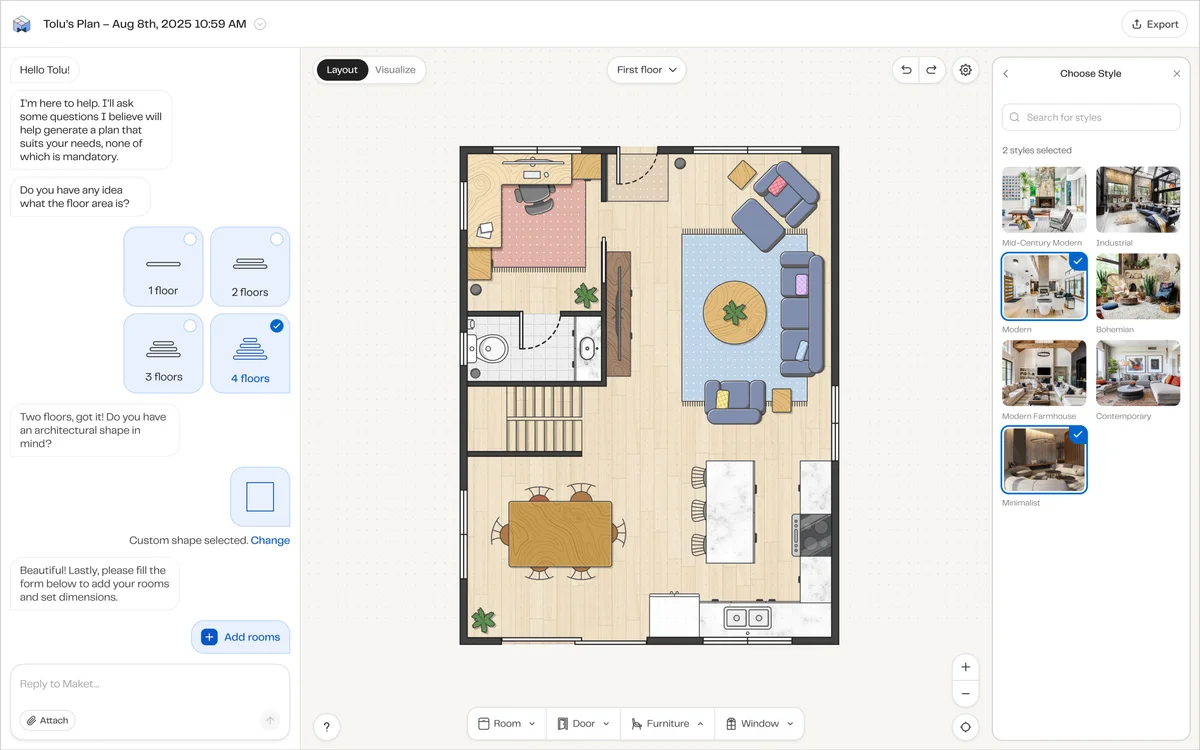
Effortlessly design floor plans and visualize them with diverse architectural styles.
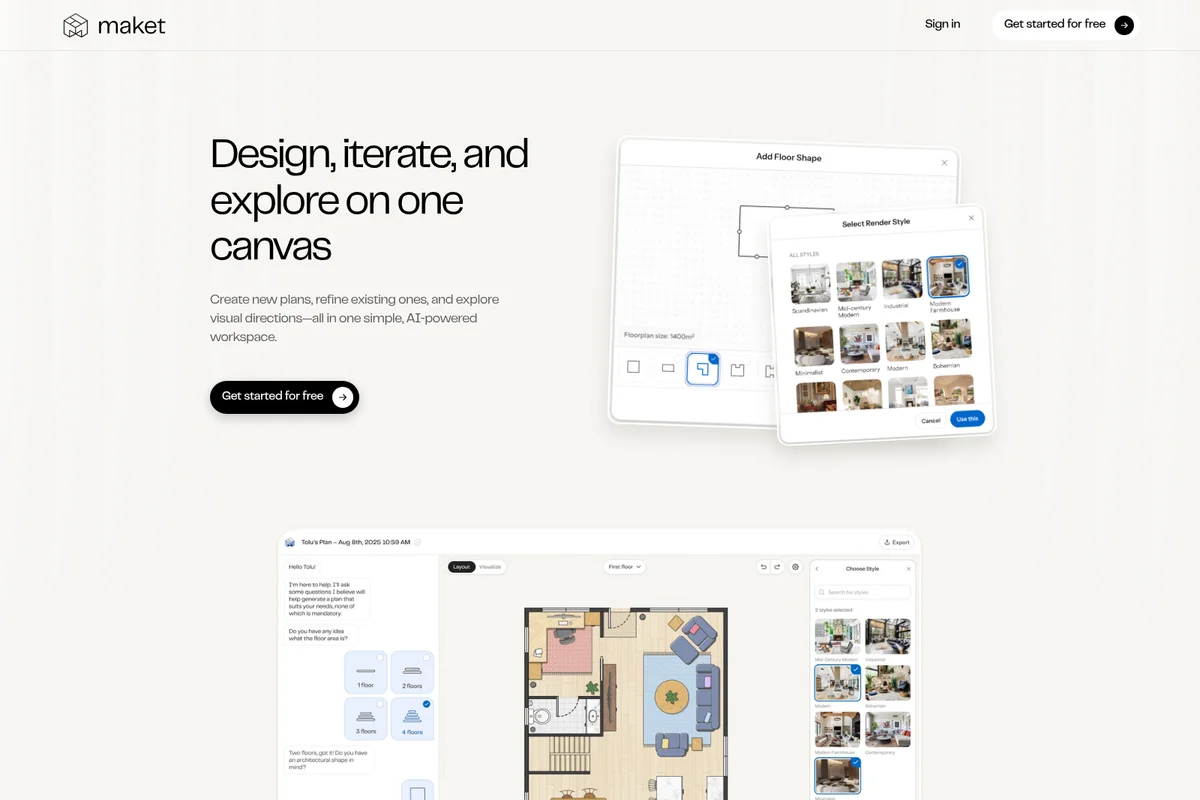
Design, iterate, and explore interior layouts with AI assistance and instant rendering.
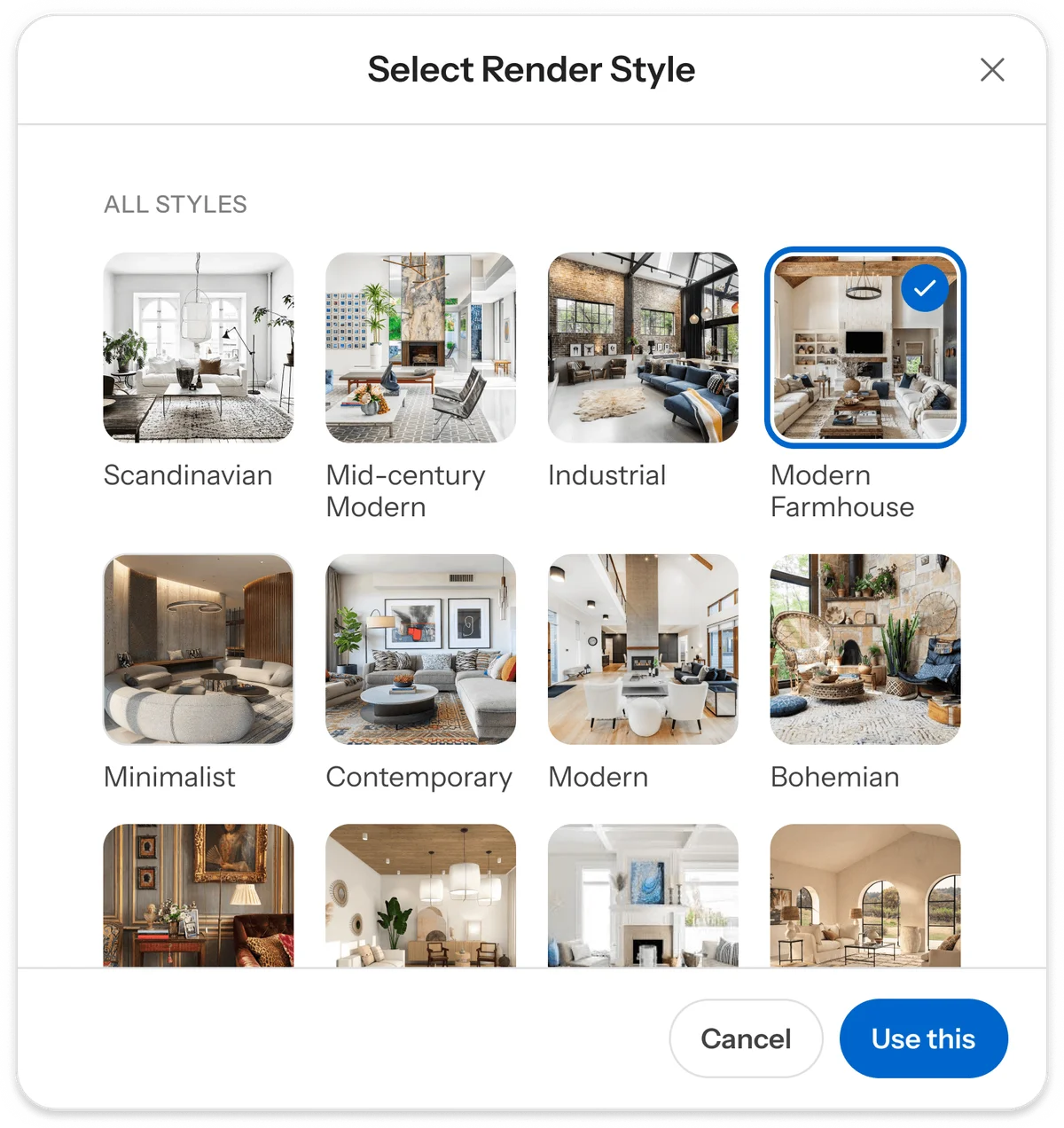
Easily select from a variety of interior design render styles for your projects.
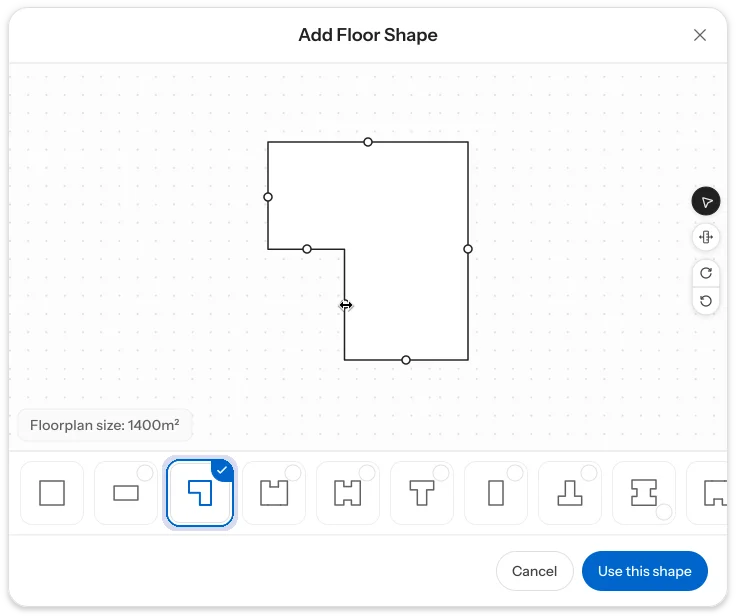
Design custom floorplans quickly by selecting and adjusting shapes.
Maket Review: Tooliverse Consensus




Based on 330 verified reviews across 5 platforms,
combined with Tooliverse's expert analysis
Maket works as a fast first-draft engine for residential layouts, turning a text prompt into editable floor plans, 3D renders, and zoning answers in one workspace. Reviewers credit it with breaking the blank-page stall and speeding up early client conversations, especially for visualization. The catch is precision: structural dimensions often need manual checking, DXF exports can need cleanup, and subscription pricing stings for solo practitioners. Treat its output as a strong starting sketch that still needs a professional's eye.
Bottom line: A strong ideation tool that turns prompts into floor plans and renders in minutes, though its dimensions need manual verification and its pricing can sting solo users.
Maket | Key Specs
- Platforms
- Web
- Pricing Model
- Freemium ($0-100/mo, Scale custom) See plans
- API Available
- Yes (Scale plan only)
- Export Formats
- PDF, DXF (paid plans)
Wins
- •Generates diverse floor plan options instantly to kickstart the design processmentioned in 84 reviews
- •Simplifies complex zoning code research with an integrated AI assistantmentioned in 62 reviews
- •Produces high-quality 3D renders that help clients visualize spaces effectivelymentioned in 58 reviews
Watch-Outs
- •Occasional inaccuracies in structural dimensions requiring manual verificationmentioned in 42 reviews
- •Subscription costs may be prohibitive for individual homeowners or small firmsmentioned in 35 reviews
- •Export options for CAD software can sometimes require significant cleanupmentioned in 28 reviews
Maket Features 2026
Floor Plan Upload
Upload a PDF, JPG or PNG of an existing plan and convert it into an editable project; Pro offers human-validated uploads with 100% accuracy.
AI Floor Plan Generator
Generates editable 2D residential floor plans from a text description of rooms, size, floors and layout.
AI Floor Plan Editing
Describe layout changes in plain English or edit directly on the canvas to refine the plan.
3D Visualization and Renders
View designs in 3D and generate photorealistic renders to explore styles, materials and finishes.
Maket User Reviews
Selected Reviews
"Finally an AI tool for architecture that actually understands constraints like setbacks and room adjacencies. Highly recommend for residential designers and planning firms."
"Maket has completely changed how I approach the initial phase of residential projects. Being able to generate dozens of floor plans in minutes is a game changer."
"Good for brainstorming but the dimensions aren't always perfect. You definitely need to double-check everything in AutoCAD before showing a client."
More from the Community
"The zoning assistant is surprisingly helpful. It saved me hours of digging through municipal PDFs. I just wish the 3D renders had a bit more customization for materials and lighting options."
"I'm a homeowner planning a renovation, and this tool made it so easy to visualize possibilities without hiring a pro immediately."
"The AI is impressive but the subscription is a bit steep for a solo designer. I'd love to see a more affordable tier for occasional users."
"Really speeds up the schematic design phase. The ability to export to DXF is essential, though layers can be messy sometimes."
"The generative floor plans are hit or miss, but when they hit, they are brilliant. Helps me see new layouts I wouldn't have thought of."
"The zoning assistant is surprisingly helpful. It saved me hours of digging through municipal PDFs. I just wish the 3D renders had a bit more customization for materials and lighting options."
"I'm a homeowner planning a renovation, and this tool made it so easy to visualize possibilities without hiring a pro immediately."
"The AI is impressive but the subscription is a bit steep for a solo designer. I'd love to see a more affordable tier for occasional users."
"Really speeds up the schematic design phase. The ability to export to DXF is essential, though layers can be messy sometimes."
"The generative floor plans are hit or miss, but when they hit, they are brilliant. Helps me see new layouts I wouldn't have thought of."
"Customer support is very responsive. I had an issue with my export and they helped me resolve it within an hour. Great team."
"It's a bit buggy on mobile sometimes. The web version is much more stable. Hope they fix iPad scaling issues soon."
"Impressive tech. It's not going to replace an architect, but it's the best assistant I've had for the blank page problem."
"The 3D visualization is top-notch for an automated tool. It really helps bridge the communication gap with clients who struggle to read traditional 2D plans."
"Customer support is very responsive. I had an issue with my export and they helped me resolve it within an hour. Great team."
"It's a bit buggy on mobile sometimes. The web version is much more stable. Hope they fix iPad scaling issues soon."
"Impressive tech. It's not going to replace an architect, but it's the best assistant I've had for the blank page problem."
"The 3D visualization is top-notch for an automated tool. It really helps bridge the communication gap with clients who struggle to read traditional 2D plans."
Maket Pricing 2026
View SourceThe free plan's 30 credits cover exactly one floor plan (20) and one render (10), enough to judge output quality, though nothing can be downloaded. Homeowner at $20/month is the tier to pick: 300 credits stretch to 15 floors or 30 renders, and it adds multi-floor generation, AI editing and PDF/DXF exports. Credits expire each cycle, so subscribe when a project is actually active.
Maket In-Depth Review 2026

Maket is an AI home design studio that turns a text prompt into an editable residential floor plan, from one to four stories, and shows it in 3D on the same canvas. You can describe rooms, square footage and style, upload an existing PDF, JPG or PNG, or draw from scratch, then edit in plain English or directly on the canvas. It runs in the browser and on mobile, and the company claims more than 1.5 million users onboarded.
What It's Like Day-to-Day
The core loop is generate, compare, refine. Describe a three-bedroom, two-bathroom, two-floor home and Maket returns several layouts to react to, the capability cited most often, in 84 reviews. Architects and designers describe it as a way to skip the tedious early sketching, and as one G2 studio director put it, it is "the best assistant I've had for the blank page problem". Refinement happens in plain English, such as asking it to add a full bathroom next to the third bedroom, or directly on the canvas.
Two other capabilities show up repeatedly in reviews.
Maket: Frequently Asked Questions (FAQs)
How much does Maket cost?
Maket is free to start with 30 credits and no credit card required. Homeowner is $20/month with 300 credits, Pro is $100/month with 3,000 credits, and Scale has custom pricing. Top-up packs are available to paid subscribers and never expire.
Is Maket free?
Yes, Maket offers a free plan with 30 one-time credits and no credit card required. It includes single-floor plan generation, the floor plan editor, render generation and link sharing, but downloadable exports are for paid plans only.
Does Maket offer a free trial?
No, Maket does not use a time-limited free trial. The Free plan gives 30 one-time credits with no credit card required, which you can use for as long as they last before deciding to upgrade.
How do Maket credits work?
Generating or uploading a floor plan uses 20 credits per floor, a render uses 10 credits, and an optimization uses 5 credits. Free includes 30 one-time credits, while Homeowner and Pro credits refresh monthly and expire at the end of each cycle.
Maket: Verified Data Sheet
| # | Label | Data Point |
|---|---|---|
| [1] | Maket Consensus: 7.97/10 | Maket is a well-reviewed tool among AI design tools in the Tooliverse index, with a consensus score of 7.97/10 across 330 verified reviews. |
| [2] | What is Maket | Maket is an AI home design studio that generates editable residential floor plans from text prompts and visualizes them in 3D. It claims 1.5M+ users onboarded, with a free plan and paid plans from $20/month. |
| [3] | Tooliverse Consensus on Maket | Maket works as a fast first-draft engine for residential layouts, turning a text prompt into editable floor plans, 3D renders, and zoning answers in one workspace. Reviewers credit it with breaking the blank-page stall and speeding up early client conversations, especially for visualization. The catch is precision: structural dimensions often need manual checking, DXF exports can need cleanup, and subscription pricing stings for solo practitioners. Treat its output as a strong starting sketch that still needs a professional's eye. |
| [4] | Maket Verdict | Maket bottom line: A strong ideation tool that turns prompts into floor plans and renders in minutes, though its dimensions need manual verification and its pricing can sting solo users. |
| [5] | Free: Free | Maket offers a functional Free tier with 30 one-time AI credits and single-floor plan generation, making its AI tools accessible at no cost. |
| [6] | Client-ready 3D renders (58 reviews) | Maket produces 3D visualizations and photorealistic renders that help clients understand spaces, a strength cited in 58 user reviews; each render costs 10 credits. |
| [7] | Accessible interface (45 reviews) | Maket offers an intuitive interface that makes professional architectural tools accessible, praised in 45 user reviews, with 3 ways to start a project: AI prompt, draw from scratch, or upload an existing plan. |
| [8] | Fast constraint-based iteration (39 reviews) | Maket supports rapid iteration on residential layouts under specific constraints, a capability mentioned in 39 user reviews; plans can be edited with plain-English prompts or directly on the canvas. |
| [9] | Pro: $100/month | Maket Pro costs $100 monthly and includes 3,000 AI credits per month, significantly expanding on the free tier's capabilities. |
| [10] | Instant floor plan options (84 reviews) | Maket generates multiple residential floor plan options from a text prompt within minutes, covering 1 to 4 stories, a strength cited in 84 user reviews as the fastest way to start a design. |
| [11] | Dimensions need manual verification (42 reports) | Maket may produce inaccurate structural dimensions that require manual verification, according to 42 user reports; its own documentation states designs are not construction-ready without professional review. |
| [12] | Pricing steep for solo users (35 reports) | Maket subscription costs may feel prohibitive for individual homeowners or small firms, according to 35 user reports, with Homeowner at $20/month and Pro at $100/month. |
| [13] | Changed how I start residential projects | A verified iOS App Store reviewer noted that Maket "has completely changed how I approach the initial phase of residential projects," adding that generating dozens of floor plans in minutes is "a game changer." |
Best Maket Alternatives

Planner 5D
Design your dream home in 10 minutes with AI-powered 3D visualization and realistic 4K renders.
Finch
Where architects and AI design together—from concept to schematic design in hours, not weeks.

Spacely AI
Turn sketches into photorealistic renders in under 60 seconds—no modeling skills required.