
Aider Review 2026 - AI Pair Programming CLI
Verified Sep 17, 2026 by Tooliverse Editorial
Aider brings AI pair programming to your command line, editing real files in your local git repo instead of just chatting about code. It connects to GPT-4, Claude, and dozens of other LLMs to write, refactor, and fix your codebase.
This AI Tool Replaces Claude Code & is Free [Aider]
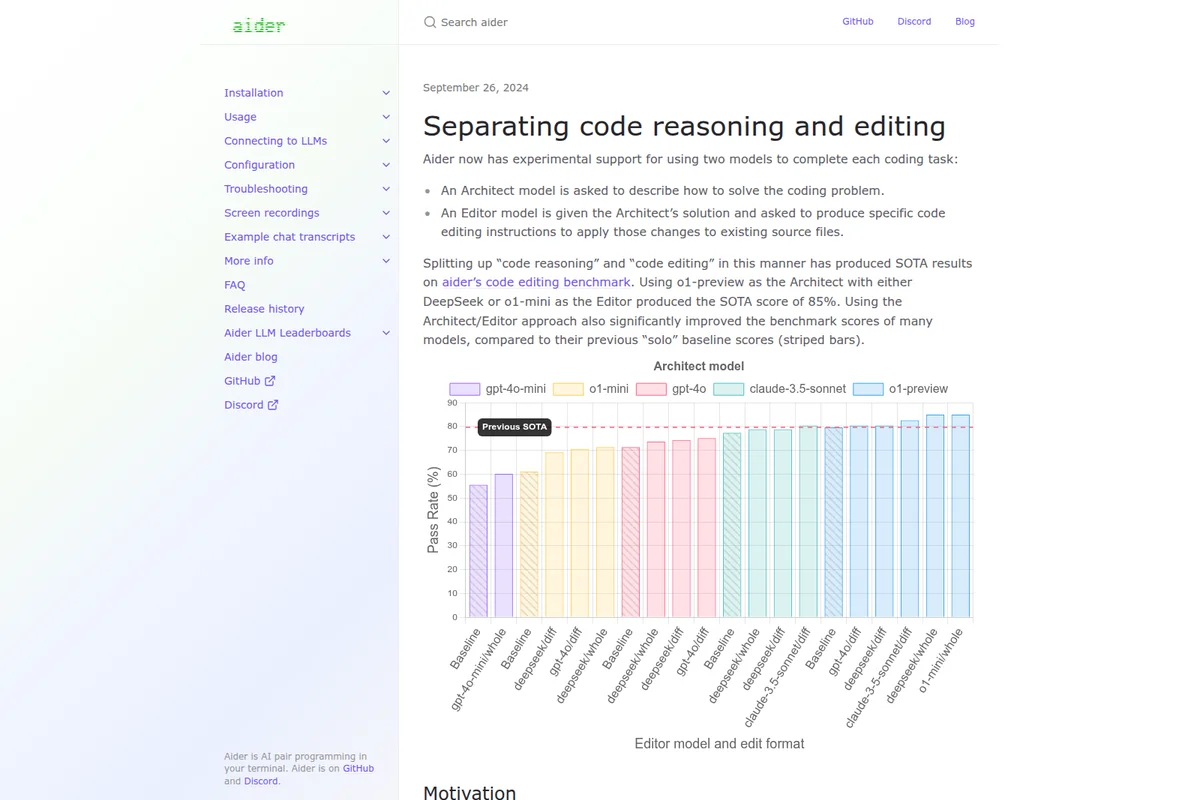
Benchmark results demonstrating improved pass rates with the new Architect/Editor approach.
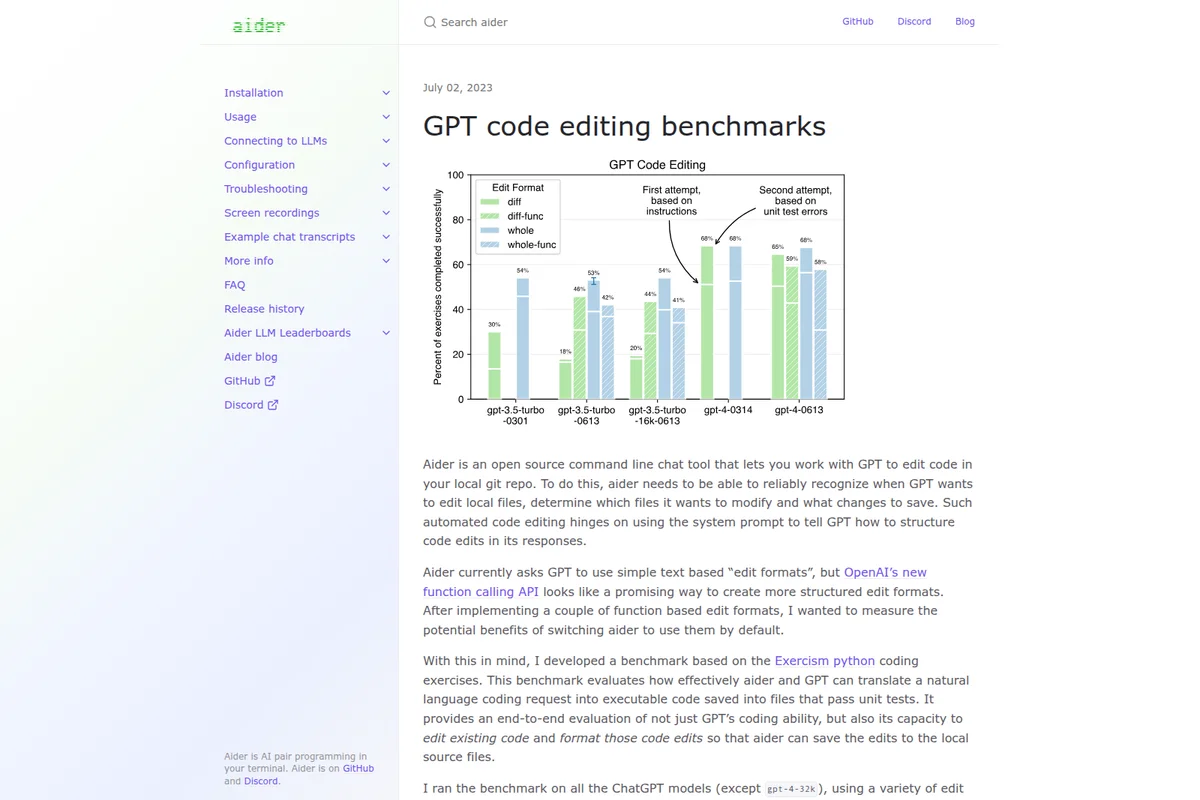
Compare GPT models' code editing performance using Aider's benchmarks.
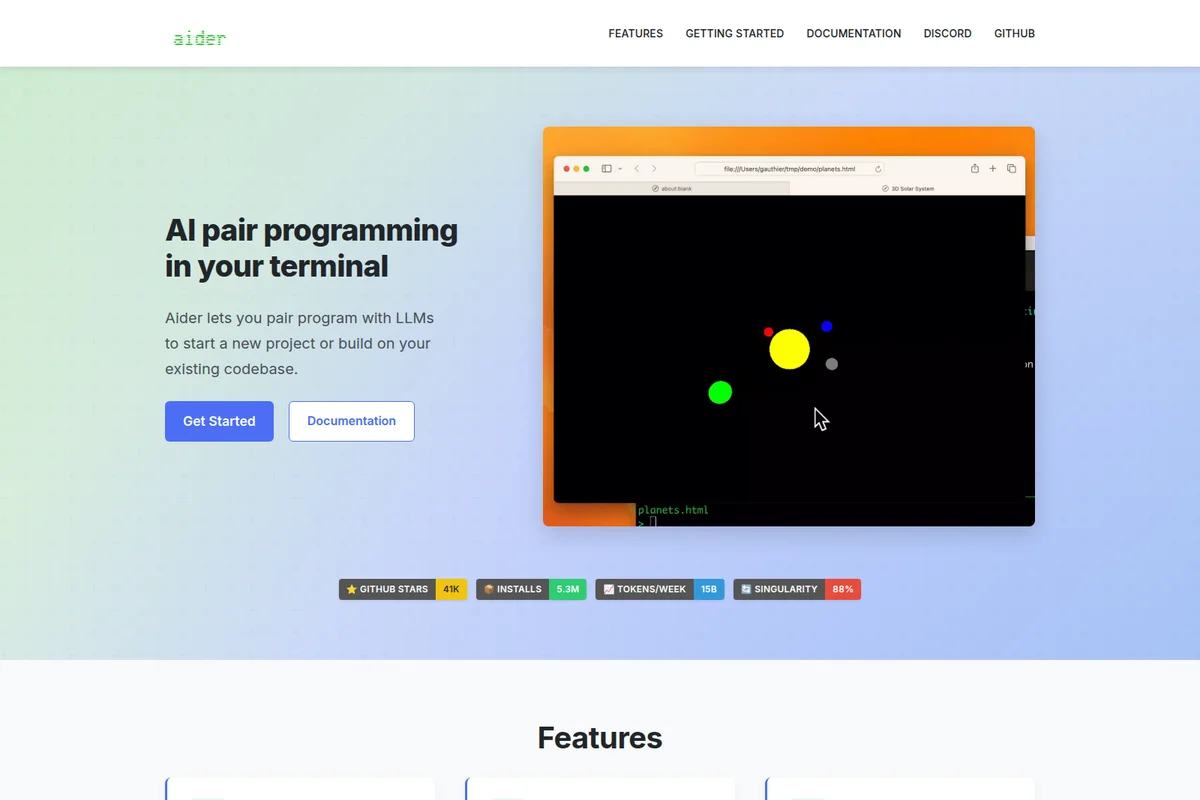
AI pair programming helps you build and visualize projects rapidly.
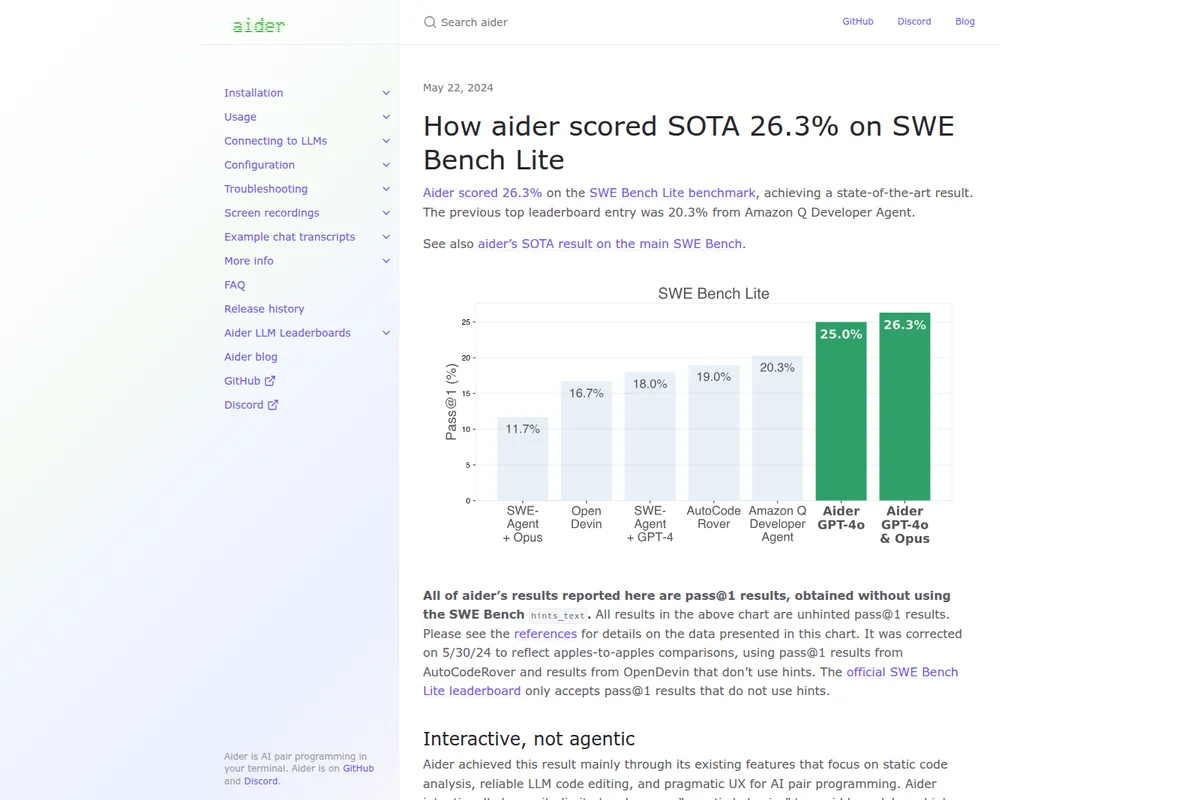
See aider's state-of-the-art performance on the SWE Bench Lite benchmark.
Aider Review: Tooliverse Consensus




Based on 1k+ verified reviews across 3 platforms,
combined with Tooliverse's expert analysis
Aider edits code directly in your local git repository instead of leaving you to copy-paste from a chat window, and its architect mode has become the reference point developers use when judging autonomous multi-file editing. The repository map lets it work accurately on large codebases without constant context overload, while automatic git commits keep every AI-driven change reversible. The tradeoff shows up in token spend during heavy refactors and a CLI learning curve for developers used to GUI tools.
Bottom line: A top-tier terminal coding assistant whose architect mode and repository mapping handle multi-file refactors better than almost anything else, though token costs demand active management.
Aider | Key Specs
Wins
- •Executes complex multi-file refactors autonomously using the powerful architect modementioned in 342 reviews
- •Maintains a clean version history with automatic, descriptive Git commitsmentioned in 285 reviews
- •Provides flexibility by supporting both top-tier cloud models and local LLMsmentioned in 210 reviews
Watch-Outs
- •Consumes tokens rapidly during large refactors, leading to unexpected API costsmentioned in 156 reviews
- •Requires a learning curve for developers not comfortable with CLI-only interfacesmentioned in 112 reviews
- •Occasionally introduces logic regressions that require careful manual diff verificationmentioned in 89 reviews
Aider Features 2026
AI Pair Programming in the Terminal
Aider works directly in your command line, letting you chat with an LLM about your codebase while it makes real edits to your local files.
Repository Map
Aider automatically builds a concise map of your entire git repository (using tree-sitter) showing key symbols and signatures, giving LLMs enough context to understand and edit large codebases efficiently.
Architect/Editor Model Pairing
Pair a strong reasoning model (like o1) as the 'architect' to plan changes with a cheaper, faster model (like gpt-4o) as the 'editor' to apply them, improving results and reducing cost.
Aider in Your IDE (Watch Files)
Aider can watch your source files and respond to inline AI comments (e.g., '# ... AI!') added in your favorite editor, bringing AI pair programming into any IDE.
Aider User Reviews
Selected Reviews
"Aider's architect mode with Claude 3.5 Sonnet is the closest thing to magic I've seen in dev tools. It actually understands the relationship between files and makes coherent changes across the entire codebase without me having to copy-paste anything."
"Aider handles multi-file refactors better than any VS Code extension I've tried. The way it manages the repository map ensures the LLM always has the right context without hitting token limits too early."
"Occasionally struggles with very deep inheritance trees, but usually gets it right on the second try. It's much better than the built-in Copilot chat for complex logic."
More from the Community
"The repo map feature is a game changer for large projects."
"Love the auto-commit feature, makes rolling back bad AI suggestions trivial. It keeps my git history clean while I experiment with different implementation ideas."
"It's great but the token costs add up fast if you aren't careful with context. I accidentally spent $10 in an hour because I kept the whole repo in context while doing minor CSS tweaks. Needs better cost warnings."
"Best CLI tool for coding. Period."
"The setup was a bit finicky with my local LLM, but once it worked, it was flawless. Using it with Ollama is a great way to keep costs down."
"The repo map feature is a game changer for large projects."
"Love the auto-commit feature, makes rolling back bad AI suggestions trivial. It keeps my git history clean while I experiment with different implementation ideas."
"It's great but the token costs add up fast if you aren't careful with context. I accidentally spent $10 in an hour because I kept the whole repo in context while doing minor CSS tweaks. Needs better cost warnings."
"Best CLI tool for coding. Period."
"The setup was a bit finicky with my local LLM, but once it worked, it was flawless. Using it with Ollama is a great way to keep costs down."
"I use it every day for boilerplate. It saves me hours of typing."
"Wish there was a GUI for some of the more complex diff views, but the CLI is solid. Sometimes the terminal output gets a bit cluttered during large refactors."
"The integration with Git is seamless and feels natural."
"Sometimes it deletes comments I wanted to keep, so I have to watch the diffs closely. Still, it's faster than writing the code manually."
"The speed at which I can prototype now is insane."
"I use it every day for boilerplate. It saves me hours of typing."
"Wish there was a GUI for some of the more complex diff views, but the CLI is solid. Sometimes the terminal output gets a bit cluttered during large refactors."
"The integration with Git is seamless and feels natural."
"Sometimes it deletes comments I wanted to keep, so I have to watch the diffs closely. Still, it's faster than writing the code manually."
"The speed at which I can prototype now is insane."
Aider Pricing 2026
View SourceAider itself costs nothing; it's free and open source. Your only expense is the LLM API you connect, billed directly by OpenAI, Anthropic, or whichever provider you choose. That structure rewards discipline: pair a strong model for planning with a cheaper one for applying edits, and scope requests to relevant files instead of loading the entire repo, especially on large refactors where costs can climb fast.
Aider In-Depth Review 2026

Aider is an open-source, terminal-based AI pair programmer that edits files directly inside your local git repository instead of just spitting out code in a chat window. It connects to GPT-4, Claude, Gemini, DeepSeek, and dozens of other models using your own API key, or runs entirely offline with local models like Ollama. The project famously eats its own cooking: recent releases report that Aider writes 70 to 80 percent of its own new code, with some releases reaching as high as 92 to 93 percent.
What It's Like Day-to-Day
The core workflow is refreshingly simple once you're in it: you describe what you want changed in plain English, and Aider figures out which files need touching and makes the edits. The architect mode, where a strong reasoning model plans the change and a faster model applies it, is what reviewers keep coming back to. One Hacker News user described running architect mode with Claude 3.
Aider Security & Compliance
Privacy Commitments
- Analytics are opt-in, anonymous, and share no personal information
Aider: Frequently Asked Questions (FAQs)
Is Aider free to use?
Yes, Aider is free and open source. You only pay for usage of the underlying LLM API (such as OpenAI, Anthropic, or DeepSeek) that you connect to aider with your own API key.
What LLMs does Aider support?
Aider can connect to most LLMs, including OpenAI, Anthropic, Gemini, GROQ, LM Studio, xAI, Azure, Cohere, DeepSeek, Ollama, OpenRouter, GitHub Copilot, Vertex AI, and Amazon Bedrock.
What is Aider?
Aider is AI pair programming in your terminal - a command-line tool that lets you work with an LLM to edit code directly in your local git repository.
How much of Aider's own code is written by Aider?
Aider writes most of its own code - usually about 70-80% of the new code in each release, based on statistics computed from the git commit history of the aider repo. Some releases have reported figures as high as 92-93%.
Aider Integrations
| OpenAI | Anthropic | Gemini |
| GROQ | LM Studio | xAI |
| Azure | Cohere | DeepSeek |
| Ollama | OpenRouter | GitHub Copilot |
| Vertex AI | Amazon Bedrock | GitHub |
| GitHub Codespaces | Replit | Docker |
Aider: Verified Data Sheet
| # | Label | Data Point |
|---|---|---|
| [1] | Aider Consensus: 9.65/10 | Aider is one of the highest-rated AI coding tools in the Tooliverse index, with a consensus score of 9.65/10 across 1,435 verified reviews. |
| [2] | What is Aider | Aider is an open-source, terminal-based AI pair programming tool that edits real files in your local git repository using LLMs like GPT-4, Claude, and Gemini. It writes 60-90%+ of its own code per release and integrates with virtually any LLM provider via user-supplied API keys. |
| [3] | Tooliverse Consensus on Aider | Aider edits code directly in your local git repository instead of leaving you to copy-paste from a chat window, and its architect mode has become the reference point developers use when judging autonomous multi-file editing. The repository map lets it work accurately on large codebases without constant context overload, while automatic git commits keep every AI-driven change reversible. The tradeoff shows up in token spend during heavy refactors and a CLI learning curve for developers used to GUI tools. |
| [4] | Aider Verdict | Aider bottom line: A top-tier terminal coding assistant whose architect mode and repository mapping handle multi-file refactors better than almost anything else, though token costs demand active management. |
| [5] | Aider (Open Source): Free | Aider offers its Aider (Open Source) tier completely free, giving developers a fully functional AI pair programming CLI tool that connects to any supported LLM using their own API key, making AI-assisted coding accessible at no cost. |
| [6] | Autonomous multi-file refactors via architect mode | Aider executes complex multi-file refactors autonomously through its architect mode, a capability validated as a standout strength in 342 user reviews. |
| [7] | Automatic descriptive Git commits | Aider maintains a clean version history by generating automatic, descriptive Git commits for every change, a feature praised in 285 user reviews. |
| [8] | Works with cloud and local LLMs | Aider gives developers flexibility to pair with top-tier cloud models like Claude and GPT-4 or run entirely on local LLMs such as Ollama, a benefit cited in 210 user reviews. |
| [9] | Repository map improves edit accuracy | Aider improves the accuracy of its code changes by building a comprehensive repository map for context, a feature highlighted in 195 user reviews as key to handling large codebases. |
| [10] | Rapid token use in large refactors | Aider can consume tokens rapidly during large refactors, leading to unexpected API costs, according to 156 user reports. |
| [11] | CLI-only learning curve | Aider requires a learning curve for developers unaccustomed to CLI-only interfaces, a challenge noted in 112 user reviews. |
| [12] | Privacy: Analytics are opt-in, anonymous, and share no personal information | Aider privacy protections include Analytics are opt-in, anonymous, and share no personal information. |
| [13] | Architect mode called "closest thing to magic" | Aider's architect mode paired with Claude 3.5 Sonnet was described by a Hacker News reviewer as "the closest thing to magic" in dev tools, noting it "actually understands the relationship between files and makes coherent changes across the entire codebase." |
Best Aider Alternatives

Claude Code
Hand off bug fixes, tests, and multi-day migrations to an AI that plans, codes, and ships pull requests.
Cline
Ship code faster with an open source AI coding agent that works in your editor, terminal, or your own products.
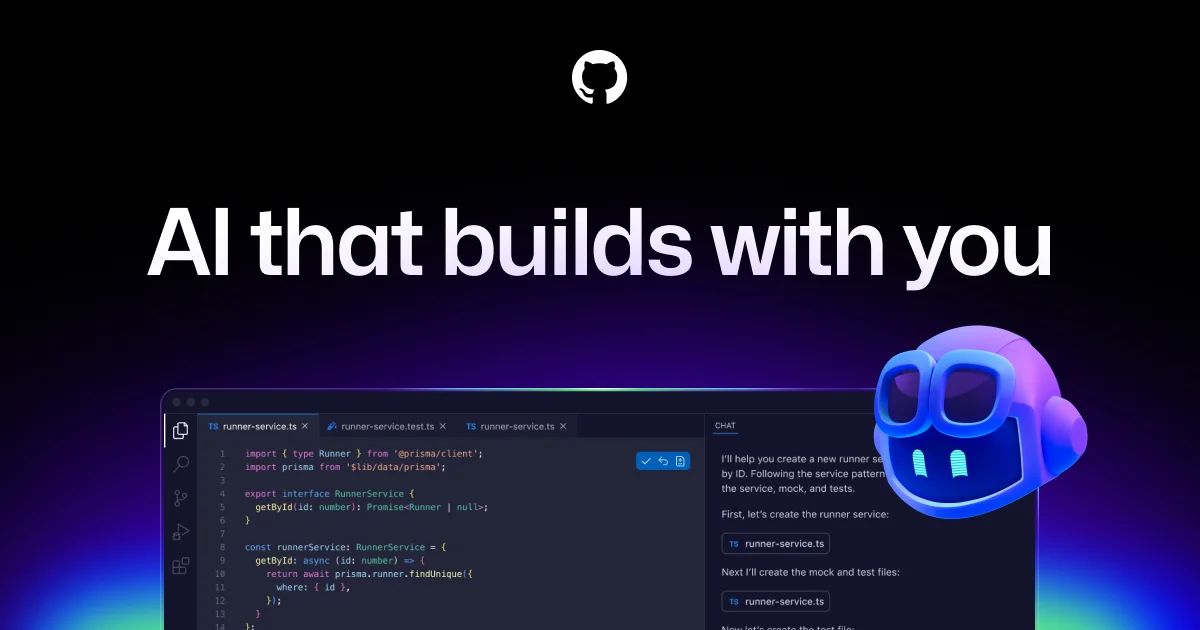
GitHub Copilot
Your AI accelerator for every workflow, from the editor to the enterprise.