
Clean Email Review 2026 - Inbox Cleanup Tool
Verified Sep 22, 2026 by Tooliverse Editorial
Clean Email tackles the mailbox you've been avoiding—thousands of unread messages, endless newsletters, junk piling up. Bulk-clean, auto-unsubscribe, and automate your inbox across any provider.
How to use Clean Email to Stop Junk Emails
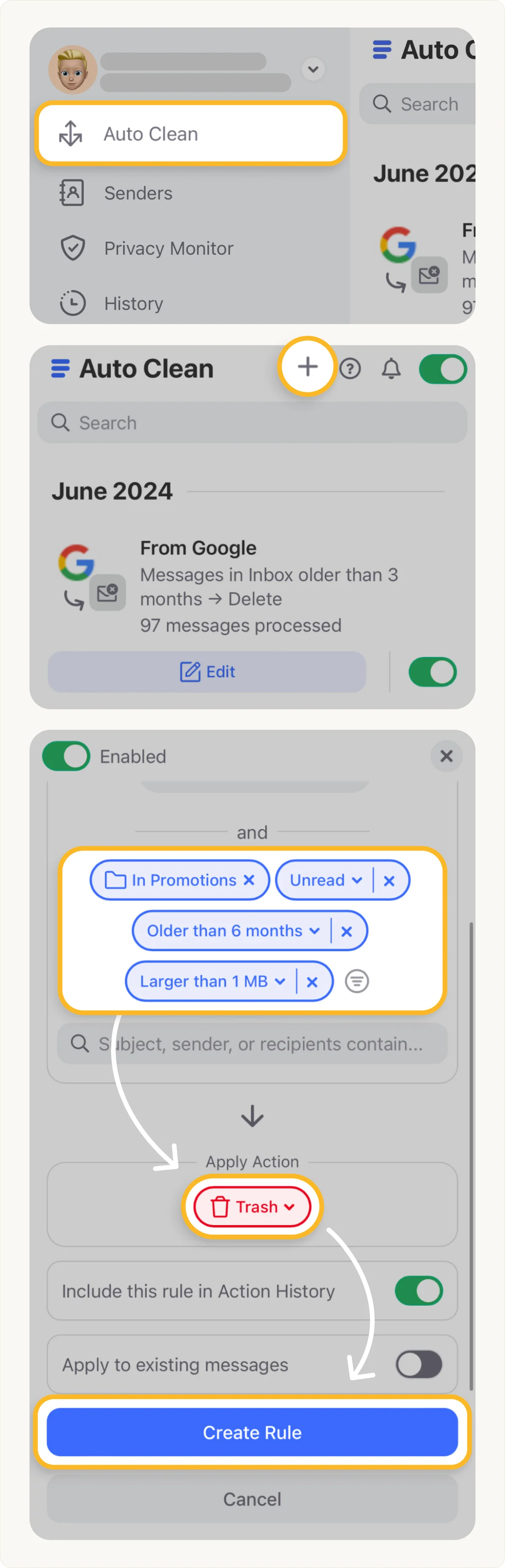
Automate email cleanup by defining custom rules based on age, size, and category.
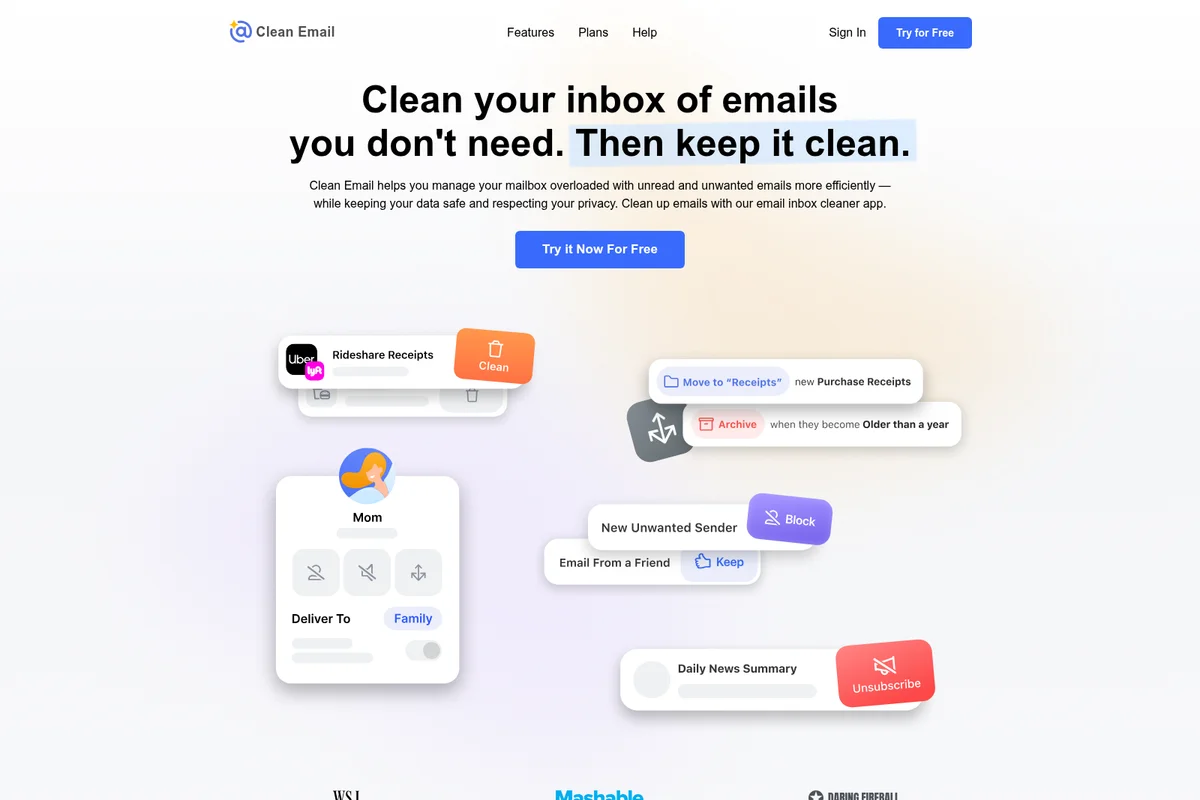
Effortlessly clean, manage, and organize your email inbox with smart actions.
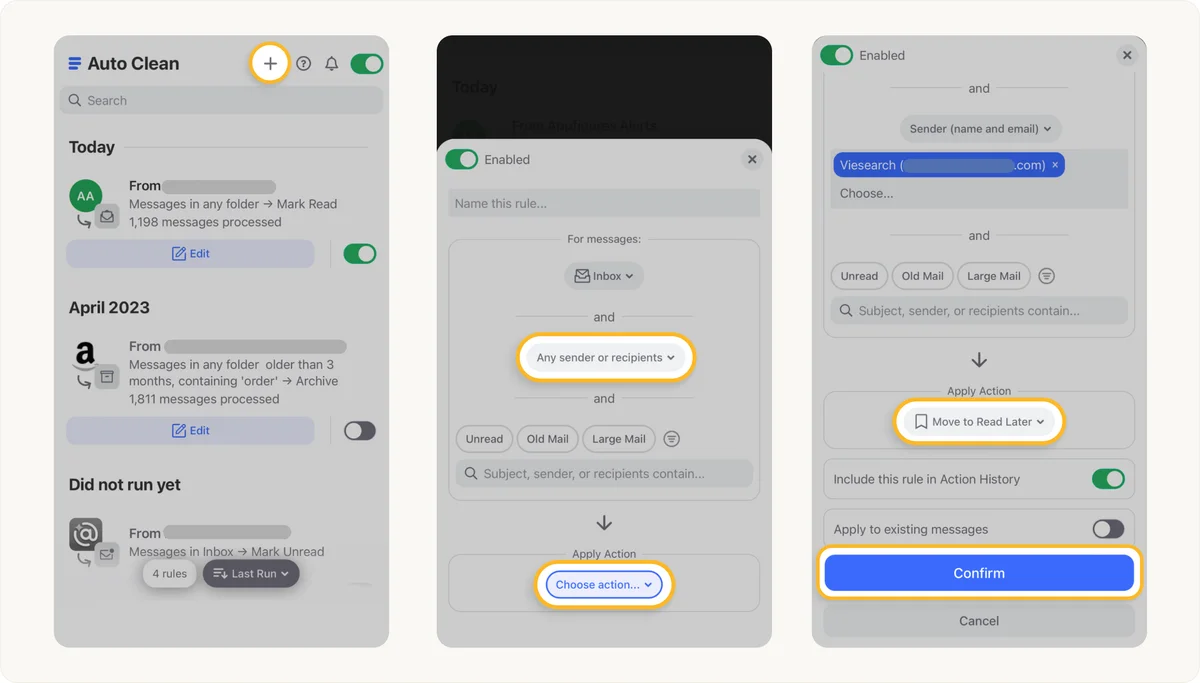
Automate email organization and inbox cleaning with custom rules.
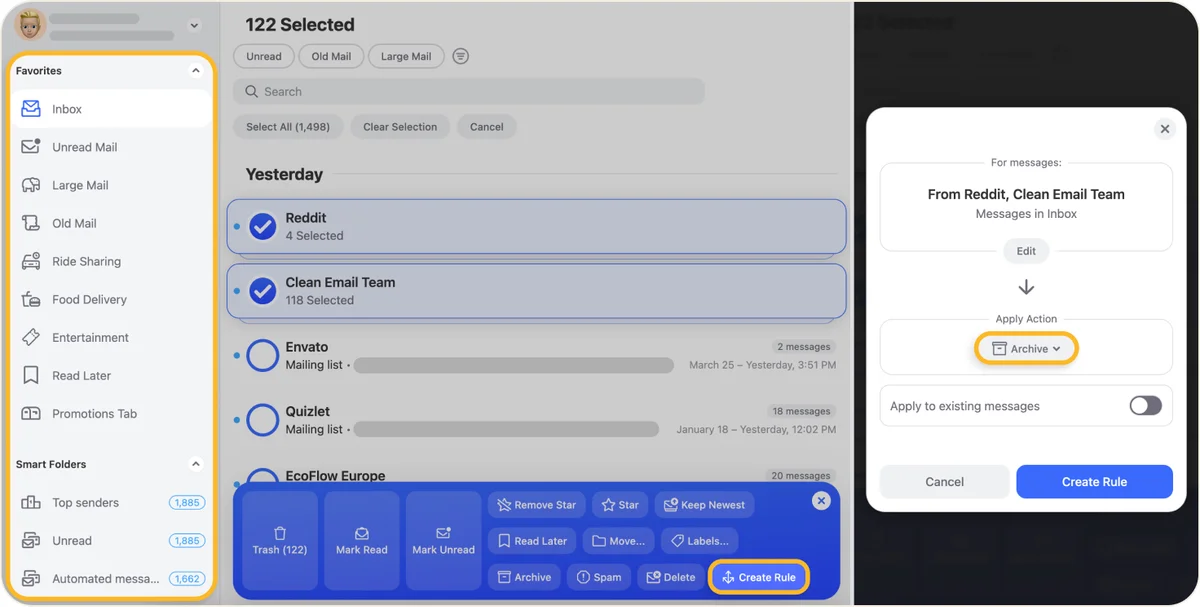
Automate email management with custom rules for specific senders.
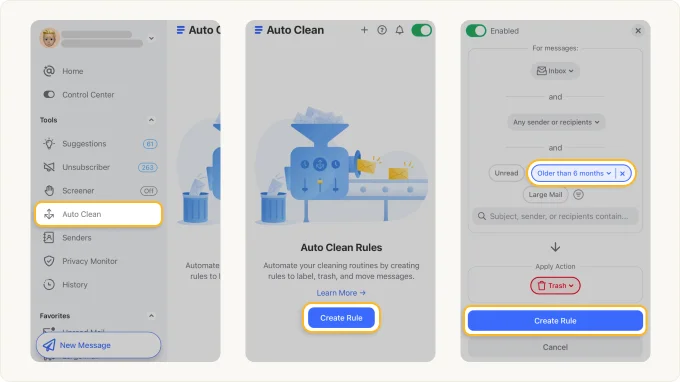
Automate email cleaning by setting rules to manage old or unwanted messages.
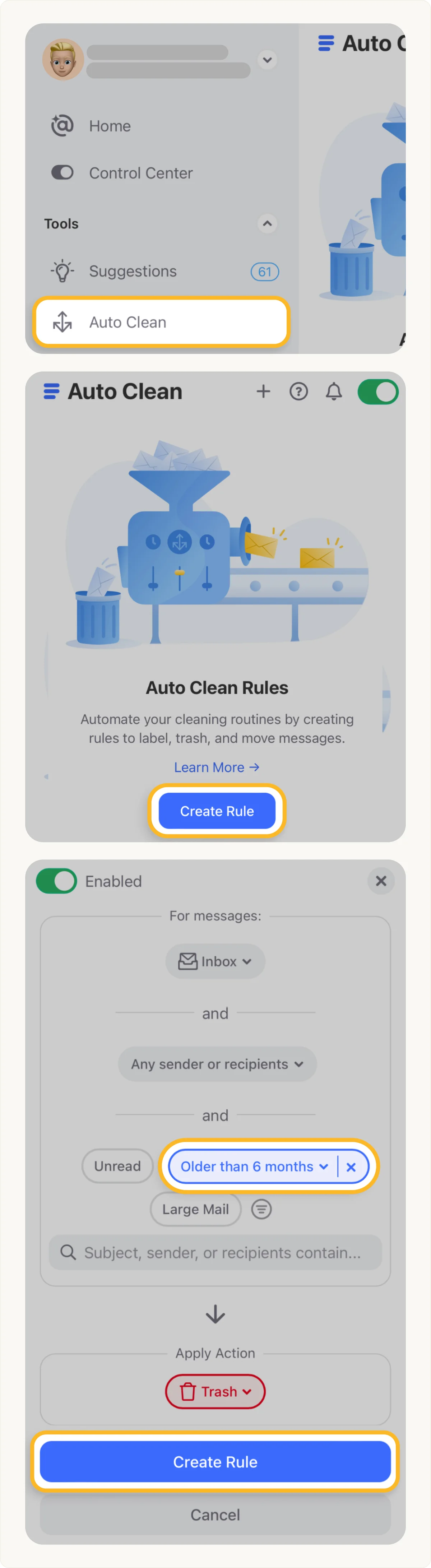
Automate email cleanup: create rules to trash old messages directly from your inbox.
Clean Email Review: Tooliverse Consensus





Based on 2k+ verified reviews across 6 platforms,
combined with Tooliverse's expert analysis
Clean Email functions as an automation layer that sits quietly on top of whatever inbox you already use, applying persistent, user-defined rules to keep clutter from ever piling back up. Reviewers consistently credit its bulk sorting and Unsubscriber tool for clearing years of backlog, and its metadata-only privacy stance builds real trust for work and school accounts. The tradeoff shows up for lighter users, who often find the subscription price hard to justify against a smaller daily email volume.
Bottom line: A leading inbox management tool for bulk sorting and unsubscribing at scale, though its subscription pricing can feel steep for anyone with a genuinely light email load.
Clean Email | Key Specs
- Platforms
- Web, iOS, Android, macOS
- Pricing Model
- Paid subscription (free trial available; specific tiers not published on scraped pages) See plans
- Privacy/Data Use
- Never sells or shares user data; email data stored only 45 days
- Security
- OAuth2 encrypted access, annual third-party security audits, Google-certified trusted provider See details
Wins
- •Automates the tedious process of sorting thousands of old emails into manageable groupsmentioned in 648 reviews
- •Provides a robust unsubscribe tool that effectively removes persistent newsletter cluttermentioned in 415 reviews
- •Maintains a strict privacy policy that ensures user data is never sold or sharedmentioned in 308 reviews
Watch-Outs
- •Subscription pricing is considered expensive for users with smaller email volumesmentioned in 178 reviews
- •Initial mailbox indexing and syncing can take significant time for large accountsmentioned in 114 reviews
- •Automated rules occasionally archive important messages that require manual recoverymentioned in 85 reviews
Clean Email Features 2026
Unsubscriber
Views all subscriptions and newsletters in one list and sends unsubscribe requests on the user's behalf—even from lists without an unsubscribe link—blocking senders who ignore requests.
Auto Clean rules
Lets users create automation rules based on sender, keyword, subject, Smart Folder, or age to automatically move, star, mark, delete, or archive emails without manual work.
Smart Folders
Predefined filters automatically gather emails into categories like Social Networks, Rideshare, Food Delivery, and Online Shopping so they can be reviewed and cleaned in bulk.
Screener
Acts as a personal gatekeeper, blocking all mail from unknown senders until the user reviews and decides who to keep or remove.
Clean Email User Reviews
Selected Reviews
"I had over 50,000 unread emails and this tool helped me clear them in under 20 minutes. The Auto Clean feature is a game changer for keeping things tidy."
"The privacy aspect is what sold me. Most 'free' cleaners sell your data, but I feel safe using this with my work account."
"I accidentally archived a few important threads because my rules were too broad. Be careful when setting up the Auto Clean."
More from the Community
"It's a solid app, but the price is a bit high for what it does. I wish there was a cheaper tier for personal use."
"Finally, an unsubscribe tool that actually works across all my accounts. No more manual clicking on every single email."
"The Smart Views are excellent for separating my receipts from my actual conversations. Saves me so much time every morning."
"Syncing my 10-year-old Gmail account took nearly two hours, which was frustrating, but the results were worth the wait."
"I love the interface on desktop, but the mobile app feels a bit clunky. It's hard to navigate the rules on a small screen."
"It's a solid app, but the price is a bit high for what it does. I wish there was a cheaper tier for personal use."
"Finally, an unsubscribe tool that actually works across all my accounts. No more manual clicking on every single email."
"The Smart Views are excellent for separating my receipts from my actual conversations. Saves me so much time every morning."
"Syncing my 10-year-old Gmail account took nearly two hours, which was frustrating, but the results were worth the wait."
"I love the interface on desktop, but the mobile app feels a bit clunky. It's hard to navigate the rules on a small screen."
"Clean Email has completely transformed how I handle my inbox. I no longer dread opening my mail in the morning."
"The automation rules are powerful. I set it to archive anything older than 3 months that isn't from a starred contact."
"Good tool for business users who get hundreds of emails a day. It pays for itself in time saved."
"Best email organizer I've used. It's simple, effective, and doesn't try to be a full email client."
"Clean Email has completely transformed how I handle my inbox. I no longer dread opening my mail in the morning."
"The automation rules are powerful. I set it to archive anything older than 3 months that isn't from a starred contact."
"Good tool for business users who get hundreds of emails a day. It pays for itself in time saved."
"Best email organizer I've used. It's simple, effective, and doesn't try to be a full email client."
Clean Email In-Depth Review 2026

Clean Email works across Gmail, Outlook, iCloud, Yahoo, AOL, and any provider using IMAP, running as a web app plus native apps for iPhone, iPad, macOS, and Android. It layers on top of whatever email client you already use, whether that's Apple Mail or the Gmail app, without asking you to switch anything. What sets it apart is a firm line it draws around your data: it only ever reads email metadata, never the body or attachments, and it says outright that it never sells or shares what it collects.
What It's Like Day-to-Day
The first real interaction most people have with Clean Email is watching it sort chaos into categories, and it's oddly satisfying. Smart Folders group incoming mail into buckets like Social Networks, Rideshare, Food Delivery, and Online Shopping, so instead of scrolling through a single infinite list, you're clearing entire categories in bulk. One iOS reviewer described going from over 50,000 unread emails to a clean inbox in under 20 minutes, crediting Auto Clean as *"a game changer for keeping things tidy.
Clean Email Security & Compliance
Security Features
- OAuth2-based mailbox access with revocable, encrypted tokens
- Apple App-Specific Passwords support for iCloud
- Encrypted mailbox credentials, not accessible to Clean Email staff
- Metadata-only email scanning (headers only, no body/attachment download)
Privacy Commitments
- Never shares, sells, gives away, or anonymizes user data
- No advertising in the app; funded by subscription fees, not data monetization
- Email data stored only 45 days
- Certified by Google as a trusted provider and audited annually by independent security companies
Clean Email: Frequently Asked Questions (FAQs)
Is Clean Email free to try?
Clean Email offers a free trial via "Try for Free" on its website, letting users test the service before committing, and Clean Email has operated as a paid subscription service since its founding to avoid relying on ads or selling user data.
Does Clean Email read or store my email content?
No, Clean Email never downloads full emails or attachments; its algorithms only analyze email headers and metadata such as subject line, sender/recipient information, dates, and size, and this data is stored for only 45 days.
Does Clean Email sell or share my data?
No, Clean Email states it does not share, sell, give away, or "anonymize" user data, including email addresses or email content and attachments, and there is no advertising in the app because the company charges a fair subscription price instead.
Which email providers does Clean Email support?
Clean Email supports major email providers including Gmail, Yahoo, AOL, iCloud, and Outlook, as well as any other email provider using IMAP, and it works alongside any email client the user already uses.
Clean Email Integrations
| Gmail | Yahoo Mail | AOL |
| iCloud | Outlook | Apple Mail |
| Zoho Mail | IMAP (any provider) |
Clean Email: Verified Data Sheet
| # | Label | Data Point |
|---|---|---|
| [1] | Clean Email Consensus: 8.78/10 | Clean Email is a highly-rated tool among AI productivity tools in the Tooliverse index, with a consensus score of 8.78/10 across 2,218 verified reviews. |
| [2] | What is Clean Email | Clean Email, operated by Clean Email, LLC and founded in Ukraine in 2014, is a privacy-focused inbox management tool that organizes mailboxes using Smart Folders, bulk actions, and an Unsubscriber. It serves over 1.5M users worldwide, cleaning roughly 5 billion emails yearly, with a 4.5/5 rating from 3,700 reviews. |
| [3] | Tooliverse Consensus on Clean Email | Clean Email functions as an automation layer that sits quietly on top of whatever inbox you already use, applying persistent, user-defined rules to keep clutter from ever piling back up. Reviewers consistently credit its bulk sorting and Unsubscriber tool for clearing years of backlog, and its metadata-only privacy stance builds real trust for work and school accounts. The tradeoff shows up for lighter users, who often find the subscription price hard to justify against a smaller daily email volume. |
| [4] | Clean Email Verdict | Clean Email bottom line: A leading inbox management tool for bulk sorting and unsubscribing at scale, though its subscription pricing can feel steep for anyone with a genuinely light email load. |
| [5] | Automates bulk sorting of old emails | Clean Email automates the sorting of thousands of old emails into manageable groups, a capability cited by 648 user reviews as a core reason for adoption. |
| [6] | Robust unsubscribe tool, 415+ reviews | Clean Email includes a robust Unsubscriber tool that removes persistent newsletter clutter, even from lists without an unsubscribe link, and blocks non-compliant senders, validated by 415 user reviews. |
| [7] | Strict no-sell privacy policy | Clean Email maintains a strict privacy policy that ensures user data is never sold or shared, a trust factor referenced in 308 user reviews and reinforced by its metadata-only scanning approach. |
| [8] | Smart Views for faster triage | Clean Email organizes incoming mail into Smart Views like Social and Finance for faster processing, a feature praised in 286 user reviews. |
| [9] | Pricing feels steep for light users | Clean Email subscription pricing is considered expensive by users with smaller email volumes, a concern raised in 178 user reviews. |
| [10] | Slow initial sync for large mailboxes | Clean Email's initial mailbox indexing and syncing can take significant time for large accounts, an issue reported in 114 user reviews. |
| [11] | Privacy: Never shares, sells, gives away, or anonymizes user data | Clean Email privacy protections include Never shares, sells, gives away, or anonymizes user data, No advertising in the app; funded by subscription fees, not data monetization, and Email data stored only 45 days. |
| [12] | Enterprise: OAuth2-based mailbox access with revocable, encrypted tokens | Clean Email provides enterprise security with OAuth2-based mailbox access with revocable, encrypted tokens, Apple App-Specific Passwords support for iCloud, and Encrypted mailbox credentials, not accessible to Clean Email staff. |
| [13] | Cleared 50,000 unread emails in 20 minutes | Clean Email helped one iOS App Store reviewer clear over 50,000 unread emails in under 20 minutes, with the reviewer calling Auto Clean "a game changer for keeping things tidy." |
Best Clean Email Alternatives
SaneBox
Reclaim 3-4 hours a week by letting AI keep only important email in your inbox.
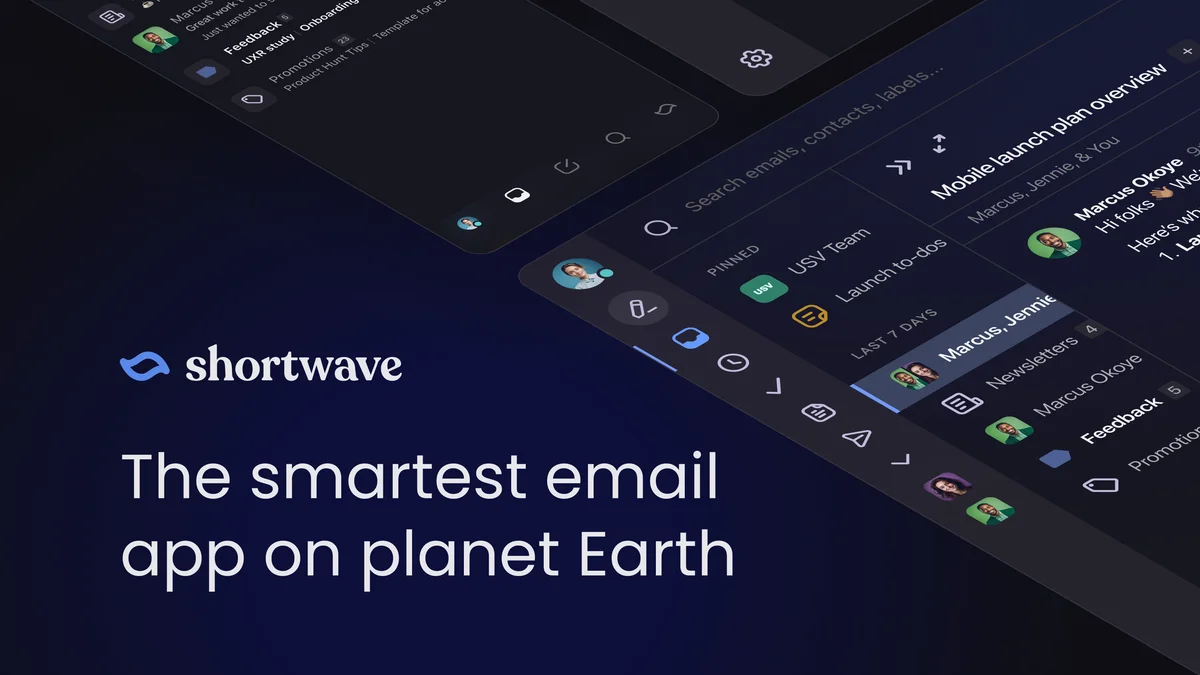
Shortwave
Save hours each day with an AI email assistant that organizes, schedules, writes, and searches with just a prompt.
Spark Mail
Smart, focused email that filters out the noise so you can focus on what's important.