
Hyper3D Review 2026 - AI 3D Generation
Verified Oct 1, 2026 by Tooliverse Editorial
Hyper3D turns a text prompt or a single image into detailed 3D assets in as little as ~4s, no 3D experience needed. Export to Blender, Unity, or Unreal and iterate with free retries.
Generate production-ready 3D assets directly inside Unity with the Hyper3D Rodin plugin.
How Good Is Hyper3D's New AI 12K Texture? Hyper3D Rodin Review
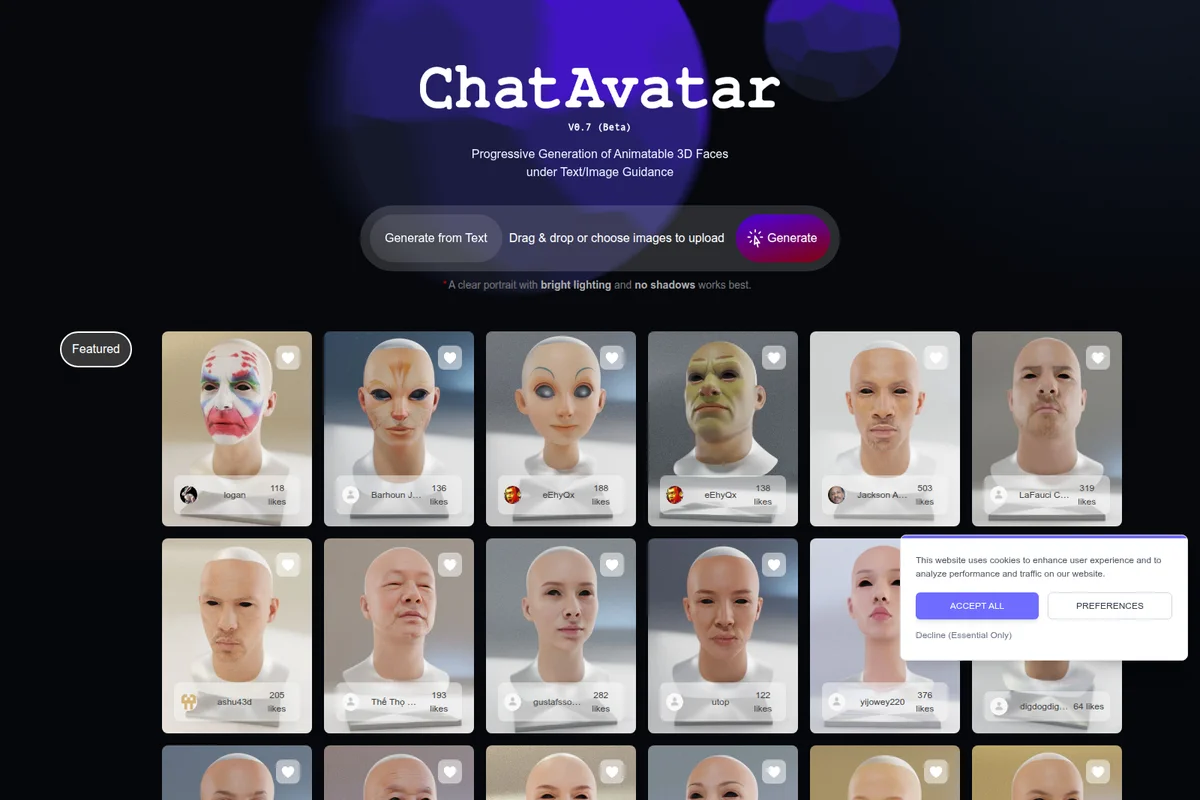
Generate diverse, animatable 3D faces from text or image guidance.
Hyper3D Review: Tooliverse Consensus


Based on 332 verified reviews across 3 platforms,
combined with Tooliverse's expert analysis
Hyper3D pairs fast geometry previews with 12K PBR textures and clean quad topology, giving game developers and product teams assets that need less rework than most AI 3D output. Smart Low Poly, Bang-to-Parts segmentation and native Blender, Unity and Unreal plugins keep that output moving into real pipelines. The costs show up elsewhere: credits drain quickly during iteration, some users were surprised by annual charges after trials, and animation-bound models still need manual topology cleanup.
Bottom line: A strong pick for production-minded 3D work thanks to crisp 12K textures and clean quad topology, though fast-burning credits, surprise annual renewals and animation cleanup deserve attention before you commit.
Hyper3D | Key Specs
- Platforms
- Web, API
- Pricing Model
- Freemium ($0-120/mo) + credit-based API See plans
- Privacy/Data Use
- GDPR certified, privacy controls for assets and prompts
- Security
- ISO/IEC 27001, GDPR, SAML 2.0 SSO See details
Wins
- •Generates high-quality 12K PBR textures that provide exceptional surface detail for close-up rendersmentioned in 142 reviews
- •Produces clean quad topology through Smart Low Poly mode, significantly reducing manual retopology timementioned in 128 reviews
- •Delivers lightning-fast geometry previews in under 4 seconds for rapid concept iterationmentioned in 115 reviews
Watch-Outs
- •Subscription model can be expensive with credits that burn quickly during iterative workflowsmentioned in 78 reviews
- •Users report unexpected annual charges and lack of notification before trial periods endmentioned in 65 reviews
- •Topology often requires additional manual cleanup before assets are truly animation-readymentioned in 56 reviews
Hyper3D Features 2026
3D ControlNet
Guides generation using Bounding Box, Voxel and Point Cloud inputs.
Partial Edit
Edits selected regions of a 3D asset without rebuilding the model.
ChatAvatar
Creates nearly production-ready 3D avatars with detailed face, body mesh, PBR materials and facial controls.
MCP Integration
Connects AI agents to Hyper3D 3D generation tools.
Hyper3D User Reviews
Selected Reviews
"The native 12K texture is a game changer. I generated an elderly character and the pore-level detail was actually visible in the render."
"Rodin Gen-2.5 is insane — 1M+ poly geometry in 4 seconds with clean, production-ready results. This changes everything for prototyping."
"hi.my experience with hyper 3d is good ,not bad. there are a several points that need to be considered. *there processing of some 3d models was not up to standard."
More from the Community
"Smart Low Poly mode is the most useful part of the workflow; it produces very clean and usable topology for Unreal Engine 5."
"Finally, an AI 3D tool that actually gives me usable topology and great textures out of the box."
"Best balance of speed and quality I've seen. The OmniCraft editor makes it even more powerful for quick mesh adjustments."
"The 'Bang-to-Parts' feature saved me hours of manual masking. It's not perfect but it gets the segmentation 90% there."
"My experience with Hyper3D was average overall. Some of the tools were useful, but I also came across a few areas that could be improved."
"Smart Low Poly mode is the most useful part of the workflow; it produces very clean and usable topology for Unreal Engine 5."
"Finally, an AI 3D tool that actually gives me usable topology and great textures out of the box."
"Best balance of speed and quality I've seen. The OmniCraft editor makes it even more powerful for quick mesh adjustments."
"The 'Bang-to-Parts' feature saved me hours of manual masking. It's not perfect but it gets the segmentation 90% there."
"My experience with Hyper3D was average overall. Some of the tools were useful, but I also came across a few areas that could be improved."
"They took a full years worth of payment without notification after the trial period. My mistake to miss cancelling but no email prior to starting the plan."
"I tried the free trial and really liked it. I paid for one year two weeks ago. As of this writing I have still not been able to use the program."
"The interface is clean but involves too many unnecessary clicks. I wish there was a one-click 'automatic' mode for the API."
"Impressive geometry, but the back of the models can still be a bit of a gamble if your reference image isn't perfect."
"They took a full years worth of payment without notification after the trial period. My mistake to miss cancelling but no email prior to starting the plan."
"I tried the free trial and really liked it. I paid for one year two weeks ago. As of this writing I have still not been able to use the program."
"The interface is clean but involves too many unnecessary clicks. I wish there was a one-click 'automatic' mode for the API."
"Impressive geometry, but the back of the models can still be a bit of a gamble if your reference image isn't perfect."
Hyper3D Pricing 2026
Creator at $24/month billed annually is the practical entry point for solo work: Smart Low-Poly, multi-image input, unlimited export and unlimited private assets, plus roughly 60 models of estimated output. Test your own reference images on the free tier first, since you only pay for results you confirm. The non-obvious catch is API access, which sits only on Business at $96/month billed annually, so developers should skip Creator regardless of budget.
Hyper3D In-Depth Review 2026

Hyper3D, built by Deemos Corporation around its Rodin model, turns a single image or a text prompt into a 3D asset with UVs and PBR materials already attached. Gen-2.5 produces meshes of up to 10 million polygons and textures up to 12K, with bounding box, voxel and point cloud controls for steering the result. Exports cover STL, FBX, OBJ, GLB, GLTF and USDZ, and plugins reach Blender, Unity, Unreal, Godot and Maya, so output lands in the tools artists already use.
What It's Like Day-to-Day
The workflow revolves around the effort dial. Gen-2.5 lets you pick a thinking level from Extreme-Low, about 4 seconds, to Extreme-High, about 80 seconds, so the natural rhythm is to churn through rough ideas fast and save the slow generations for keepers. Generation is pay by result, which means you preview before credits are committed. For game developers, Smart Low-Poly is where the time savings show up; one Reddit user building for Unreal Engine 5 called it "the most useful part of the workflow" because the clean quad topology skips much of the manual retopology pass.
Hyper3D Security & Compliance
Verified Compliance
- ISO/IEC 27001
- GDPR
Security Features
- SAML 2.0 SSO
- Role-based access and audit logs
- Encrypted storage
Privacy Commitments
- GDPR certified
- Privacy controls for 3D assets, prompts and workflows
Hyper3D: Frequently Asked Questions (FAQs)
Does Hyper3D have a free plan?
Yes, Hyper3D has a Free plan at $0 that lets you generate for free before confirming, with 10 private assets. Direct credits cost $1.5 per credit, and a free 7-day trial is also offered.
How does Hyper3D billing work?
Hyper3D supports monthly and yearly subscriptions. Yearly plans show a monthly equivalent and renew annually, and generation is pay by result so you can preview before confirming credit spend.
What is the difference between Creator and Business?
Creator suits individual production workflows, while Business adds full API access, higher Rodin redo limits, High-Poly Quad options, featured image and video models, and ChatAvatar commercial benefits.
Do Hyper3D credits expire?
Subscription credits renew each billing cycle. Direct credits cost more than subscription credits but are designed to remain available longer.
Hyper3D Integrations
| Blender | Unity | Unreal Engine |
| Godot | Maya | 3DS Max |
| Cinema 4D | NVIDIA Omniverse | ComfyUI |
Hyper3D: Verified Data Sheet
| # | Label | Data Point |
|---|---|---|
| [1] | Hyper3D Consensus: 8.42/10 | Hyper3D is a highly-rated tool among AI design tools in the Tooliverse index, with a consensus score of 8.42/10 across 332 verified reviews. |
| [2] | What is Hyper3D | Hyper3D, by Deemos Corporation, is an ISO/IEC 27001 certified AI 3D generation platform powered by Rodin for text-to-3D and image-to-3D. It offers a free tier, with paid plans from $24/month billed yearly and a credit-based API. |
| [3] | Tooliverse Consensus on Hyper3D | Hyper3D pairs fast geometry previews with 12K PBR textures and clean quad topology, giving game developers and product teams assets that need less rework than most AI 3D output. Smart Low Poly, Bang-to-Parts segmentation and native Blender, Unity and Unreal plugins keep that output moving into real pipelines. The costs show up elsewhere: credits drain quickly during iteration, some users were surprised by annual charges after trials, and animation-bound models still need manual topology cleanup. |
| [4] | Hyper3D Verdict | Hyper3D bottom line: A strong pick for production-minded 3D work thanks to crisp 12K textures and clean quad topology, though fast-burning credits, surprise annual renewals and animation cleanup deserve attention before you commit. |
| [5] | Free: Free | Hyper3D offers a functional Free tier that lets users generate for free before confirming (pay by result) and export from legacy models, making AI tools accessible at no cost. |
| [6] | 12K PBR textures, praised in 142 reviews | Hyper3D generates 12K PBR textures with exceptional surface detail for close-up renders, a strength cited in 142 user reviews, and Rodin Gen-2.5 supports up to 10 million polygons with HighPack. |
| [7] | Clean quad topology via Smart Low-Poly | Hyper3D produces clean quad topology through its Smart Low-Poly mode, which reduces manual retopology time according to 128 user reviews. |
| [8] | ~4-second previews for fast iteration | Hyper3D returns geometry previews in about 4 seconds at its Extreme-Low thinking effort setting, a speed advantage for concept iteration noted in 115 user reviews. Extreme-High effort takes about 80 seconds. |
| [9] | Creator (Yearly): $24/mo (annual) | Deemos Corporation's Hyper3D Creator (Yearly) plan adds Multi-image to 3D, Smart Low-Poly, HD/Custom Texture for $24/month billed annually, significantly expanding on the free tier's capabilities. |
| [10] | Bang-to-Parts auto-segments models | Hyper3D includes a Bang-to-Parts tool that automatically segments complex models into editable components, a capability highlighted in 98 user reviews. |
| [11] | Credits burn fast during iteration | Hyper3D credits can burn quickly during iterative workflows, according to 78 user reports. Direct credits cost $1.5 per credit, and Creator starts at $24/month billed annually. |
| [12] | Surprise annual charges after trial | Hyper3D users report unexpected annual charges and a lack of notification before trial periods end in 65 reviews. Yearly plans renew annually. |
| [13] | Privacy: GDPR certified | Hyper3D's privacy protections include GDPR certified status and Privacy controls for 3D assets, prompts and workflows. |
| [14] | Enterprise: SAML 2.0 SSO | Hyper3D provides enterprise security with SAML 2.0 SSO, Role-based access and audit logs, and Encrypted storage. |
| [15] | Pore-level detail visible in 12K render | A verified Reddit reviewer noted that Hyper3D's native 12K texture is "a game changer," saying the "pore-level detail was actually visible in the render" on a generated elderly character. |
Best Hyper3D Alternatives

Tripo
Turn any image or text prompt into production-ready 3D models in seconds.

Sloyd
Turn words and images into game-ready 3D models in seconds, with unlimited generations.
Kaedim
Turn sketches and references into production-ready 3D assets, delivered in hours, not weeks.