
MailMaestro Review 2026 - AI Email Assistant
Verified Oct 2, 2026 by Tooliverse Editorial
MailMaestro writes three email drafts from a single instruction, summarizes whole threads, and tags your inbox by priority. Add it to Outlook or Gmail and cut the email grind—reportedly saving 8+ hours a week.
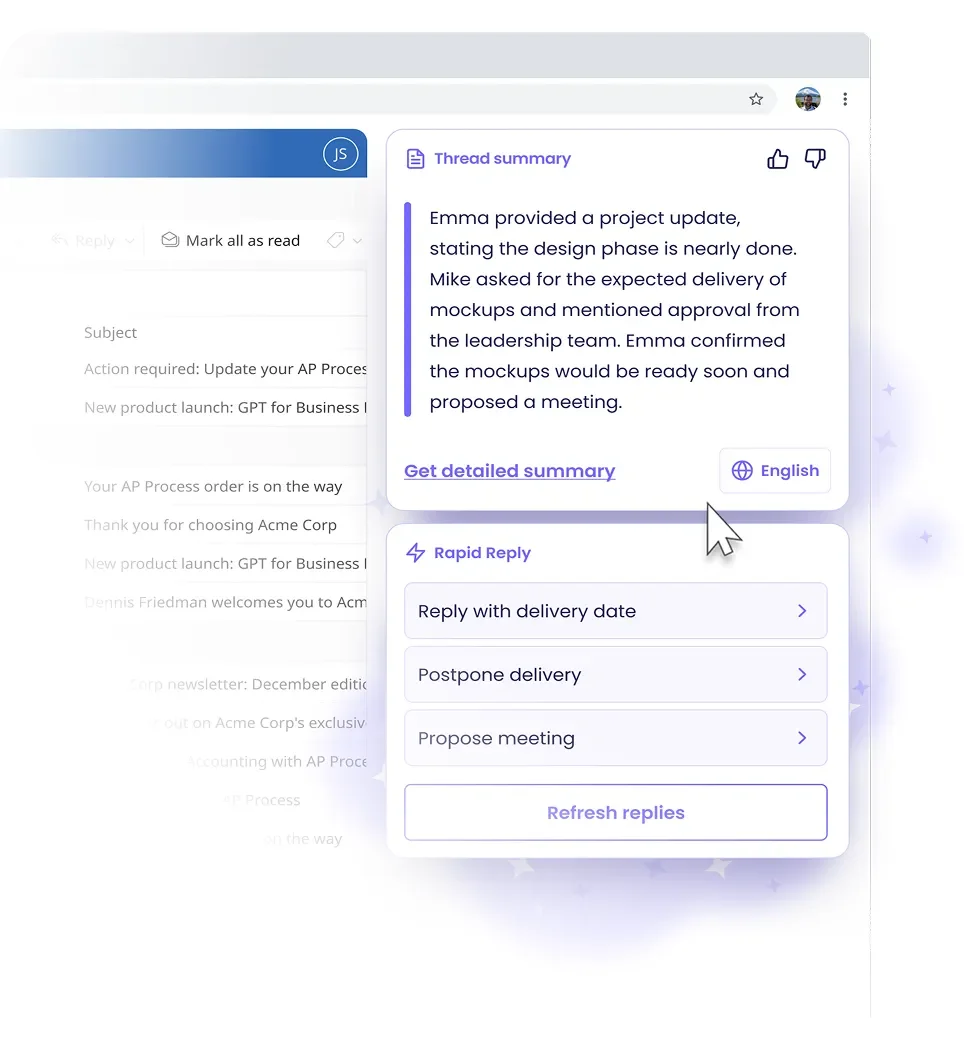
Get instant summaries of long email threads and generate rapid replies effortlessly.

AI automatically sorts and categorizes emails for a clutter-free inbox.

Protect sensitive data by intelligently anonymizing PII in your emails.

Quickly generate effective emails from simple drafts using AI in Outlook and Gmail.
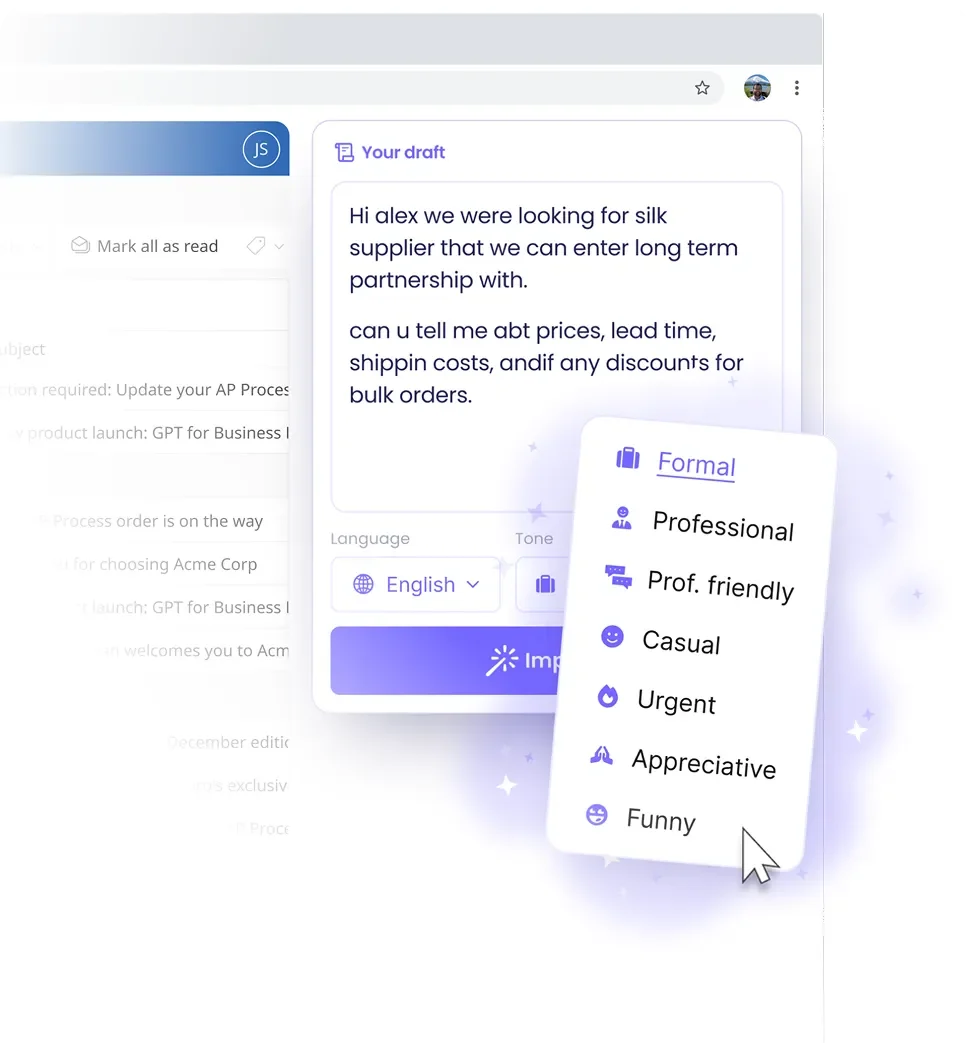
Adjust your email's tone instantly with AI for perfect communication.

AI streamlines meeting notes and helps craft rapid email replies.
MailMaestro Review: Tooliverse Consensus


Based on 202 verified reviews across 5 platforms,
combined with Tooliverse's expert analysis
MailMaestro works as an in-inbox writing and triage layer for Outlook, turning rough bullet points into polished replies, condensing sprawling threads and attachments, and shifting tone to suit each audience. Reviewers praise draft accuracy and the sidebar integration most, and calendar-slot detection earns steady mentions. The tradeoffs are a free plan capped at three requests per week, paid pricing that stings freelancers and students, drafts that sometimes need tweaking to sound personal, and a mobile experience behind the desktop extension.
Bottom line: A top-tier inbox assistant for Outlook-heavy professionals, drafting and summarizing with impressive accuracy, though its three-request free plan and price for freelancers mean casual users will hit limits fast.
MailMaestro | Key Specs
- Platforms
- Web, Chrome extension (Outlook and Gmail)
- Pricing Model
- Freemium ($0-25/seat/mo) See plans
- Privacy/Data Use
- Data never used to train AI models, zero-day retention (Enterprise)
- Security
- SOC 2 Type II, GDPR, HIPAA (BAA on request), MFA See details
Wins
- •Drafts professional emails from simple bullet points with high accuracymentioned in 84 reviews
- •Integrates natively into Outlook and Gmail sidebars for frictionless usementioned in 76 reviews
- •Summarizes long email threads and attachments instantly to save timementioned in 68 reviews
Watch-Outs
- •Free tier is heavily restricted to only three AI requests per weekmentioned in 28 reviews
- •Subscription pricing is perceived as high for individual freelancers and studentsmentioned in 18 reviews
- •AI suggestions occasionally require manual fine-tuning to match specific personal voicesmentioned in 15 reviews
MailMaestro Features 2026
AutoLabel Inbox Organization
Automatically tags and color-codes emails into categories like To Respond, FYI and Marketing (Outlook).
Ask AI Email Triage
Type a request to archive, flag or remind about emails directly from the Ask AI tab.
AI Personality
Teaches the assistant your job title, tone, word choices and contact details so drafts match your writing style.
Multilingual Writing
Write and summarize emails in 20+ languages.
MailMaestro User Reviews
Selected Reviews
"The outlook add-in is fantastic and allows me to pop open a window quickly, tell it what I want, and it instantly fires it back for inclusion."
"It understands the content of the email and generates a response letter in a professional way. Easy to combine with our existing email setup."
"Users consistently praise the time-saving capabilities, highlighting how it streamlines email management and drafting with high accuracy."
More from the Community
"Mixed bag, I'd like it to be more automated as right now it takes too many clicks to get it to respond to an email or write a new one."
"The tag at the end of every message is annoying; I have to delete it every time I send an email."
"Saves me at least an hour a day. I didn't think I'd live to see an AI assistant writing and answering my emails. It's crazy good."
"No more switching tabs from ChatGPT to Outlook to write, edit, or translate my emails. I can do it all with MailMaestro."
"A great tool for busy people who get lost in huge email chains. It reads the whole messy thread and gives a tiny summary."
"Mixed bag, I'd like it to be more automated as right now it takes too many clicks to get it to respond to an email or write a new one."
"The tag at the end of every message is annoying; I have to delete it every time I send an email."
"Saves me at least an hour a day. I didn't think I'd live to see an AI assistant writing and answering my emails. It's crazy good."
"No more switching tabs from ChatGPT to Outlook to write, edit, or translate my emails. I can do it all with MailMaestro."
"A great tool for busy people who get lost in huge email chains. It reads the whole messy thread and gives a tiny summary."
"I love the ability to change the tone of the email to apply it to different audiences that all need the same message."
"The AI-generated responses are noted for their accuracy and professionalism, making communication more efficient for our sales team."
"Helpful for summarizing threads, but the free plan limits are too tight for anyone doing serious work."
"MailMaestro is best suited for Outlook users who need a frictionless, in-client AI assistant to draft and summarize emails faster."
"I love the ability to change the tone of the email to apply it to different audiences that all need the same message."
"The AI-generated responses are noted for their accuracy and professionalism, making communication more efficient for our sales team."
"Helpful for summarizing threads, but the free plan limits are too tight for anyone doing serious work."
"MailMaestro is best suited for Outlook users who need a frictionless, in-client AI assistant to draft and summarize emails faster."
MailMaestro Pricing 2026
View SourceThree requests a week makes the free plan a trial in disguise, best used to judge draft quality during the 14-day full-feature window. Professional at $12/month billed annually is the tier most people should pick, adding summaries and smart scheduling for a modest bump in cost. Month-to-month runs $15, which suits anyone still testing, but yearly plans are non-refundable, so be sure before you commit.
MailMaestro In-Depth Review 2026

MailMaestro lives inside Outlook and Gmail, turning one short instruction into three distinct drafts that draw on the thread's context. It works in Outlook on the web, legacy Outlook and new Outlook, and reaches Gmail through a Chrome extension. Beyond drafting, it summarizes threads and attachments in more than 20 languages, and an AI Personality setting learns your job title, word choices and tone so replies sound like you wrote them.
What It's Like Day-to-Day
The workflow is short. Open the sidebar, type a few bullet points or a rough sentence, pick a language, tone and length, and choose among the drafts. Users describe the habit as quick to form, with one Capterra reviewer praising how the Outlook add-in lets them "pop open a window quickly, tell it what I want, and it instantly fires it back for inclusion." Rewrite and Polish modes cover the cases where you already have a draft and just want it sharper.
Summaries are where reviewers say the time savings pile up.
MailMaestro Security & Compliance
Verified Compliance
- SOC 2 Type II
- GDPR compliant
- HIPAA compliant (BAA on request)
- Microsoft Attested
- Google Verified
- Tier 2 CASA Verified
Security Features
- Encryption at rest and in transit
- Role-based access, MFA and least-privilege access controls
- Regular penetration testing and security audits
Privacy Commitments
- Data is never used to train AI models
- Zero-day data retention available to enterprise customers
- PII obfuscation available for enterprise clients
- Data is anonymised before sharing with LLMs
MailMaestro: Frequently Asked Questions (FAQs)
Does MailMaestro have a free plan?
Yes, MailMaestro has a free plan at $0 that includes composing, replying and improving emails, limited to a total of 3 requests per week. New users also get full functionality for the first 14 days through a free trial, with no credit card required.
How much does MailMaestro cost?
MailMaestro Professional is $15 per seat/month on monthly billing, or $12 per seat/month with annual pricing. The Maestro Duo bundle with TeamsMaestro is $25 per seat/month, and Enterprise is custom via contact sales.
What happens when the MailMaestro free trial ends?
After the trial ends, accounts revert to the Free plan with a limit of 3 AI email assistant requests per week for composing, replying and improving emails.
Is there a discount for annual plans?
Yes, choosing a yearly plan gives a 20% discount on MailMaestro.
MailMaestro Integrations
| Microsoft Outlook | Gmail | Microsoft Teams |
| Microsoft 365 | OpenAI | Anthropic Claude |
| Google Gemini |
MailMaestro: Verified Data Sheet
| # | Label | Data Point |
|---|---|---|
| [1] | MailMaestro Consensus: 9.38/10 | MailMaestro is one of the highest-rated AI productivity tools in the Tooliverse index, with a consensus score of 9.38/10 across 202 verified reviews. |
| [2] | What is MailMaestro | MailMaestro, by Maestro Labs, is a SOC 2 Type II compliant AI email assistant for Outlook and Gmail that drafts, replies to and summarizes email. Trusted by 300,000+ teams, with a free plan and paid tiers from $12/seat/month. |
| [3] | Tooliverse Consensus on MailMaestro | MailMaestro works as an in-inbox writing and triage layer for Outlook, turning rough bullet points into polished replies, condensing sprawling threads and attachments, and shifting tone to suit each audience. Reviewers praise draft accuracy and the sidebar integration most, and calendar-slot detection earns steady mentions. The tradeoffs are a free plan capped at three requests per week, paid pricing that stings freelancers and students, drafts that sometimes need tweaking to sound personal, and a mobile experience behind the desktop extension. |
| [4] | MailMaestro Verdict | MailMaestro bottom line: A top-tier inbox assistant for Outlook-heavy professionals, drafting and summarizing with impressive accuracy, though its three-request free plan and price for freelancers mean casual users will hit limits fast. |
| [5] | Free: Free | MailMaestro offers a functional Free tier with Compose, Reply and Improve with AI, limited to 3 requests per week, making AI tools accessible at no cost. |
| [6] | Accurate drafts from bullet points | MailMaestro drafts professional emails from short bullet points with high accuracy, a strength cited in 84 user reviews, and it produces 3 draft options per instruction with selectable language, tone and length. |
| [7] | Native Outlook and Gmail sidebar | MailMaestro runs natively in the sidebar of Microsoft Outlook (web, legacy and new Outlook) and in Gmail through a Chrome extension, an integration cited in 76 user reviews. |
| [8] | Thread and attachment summaries | MailMaestro summarizes long email threads and attachments in 20+ languages with selectable summary length, a time-saving capability validated by 68 user reviews. |
| [9] | Professional (Monthly): $15/seat/month | Maestro Labs's MailMaestro Professional (Monthly) empowers users with Summarize emails and attachments with AI for just $15/seat monthly, significantly expanding on the free tier's capabilities. |
| [10] | Tone matched to each audience | MailMaestro adjusts the tone of a message to suit different professional audiences, and 55 user reviews praise the ability to reframe one message for different recipients, supported by its AI Personality setting. |
| [11] | Free plan capped at 3 requests/week | MailMaestro's Free plan is limited to 3 AI requests per week for composing, replying and improving emails, a restriction noted in 28 user reviews. |
| [12] | Pricing steep for freelancers, students | MailMaestro's paid pricing, at $15/seat/month on monthly billing or $12/seat/month billed annually, is described as high for individual freelancers and students in 18 user reviews. |
| [13] | Privacy: Data is never used to train AI models | MailMaestro's privacy protections include Data is never used to train AI models, Zero-day data retention available to enterprise customers and PII obfuscation available for enterprise clients. |
| [14] | Enterprise: Encryption at rest and in transit | MailMaestro provides enterprise security with Encryption at rest and in transit, Role-based access, MFA and least-privilege access controls, and Regular penetration testing and security audits. |
| [15] | Professional replies, easy to combine | MailMaestro "understands the content of the email and generates a response letter in a professional way," and is "easy to combine with our existing email setup," according to a verified Capterra reviewer. |
Best MailMaestro Alternatives

Shortwave
Save hours each day with an AI email assistant that organizes, schedules, writes, and searches with just a prompt.

Superhuman
AI that works everywhere you work—helping you write, plan, and communicate with clarity and confidence.
Fyxer AI
Catches what needs you across email, meetings and chat, and drafts the reply.