
Napkin AI Review 2026 - Text to Visuals
Verified Oct 5, 2026 by Tooliverse Editorial
Napkin turns your words into diagrams, mind maps, flowcharts, and charts without a single prompt. Paste text, pick the visual that fits, restyle it your way, and export to PPT, PNG, PDF, or SVG.
Napkin AI: Introducing Elastic Designs – Get Right Visuals, Faster 🚀 #napkinai
Napkin AI Complete Tutorial 2026 | Turn Your Text Into Stunning Visuals in Seconds with Napkin AI
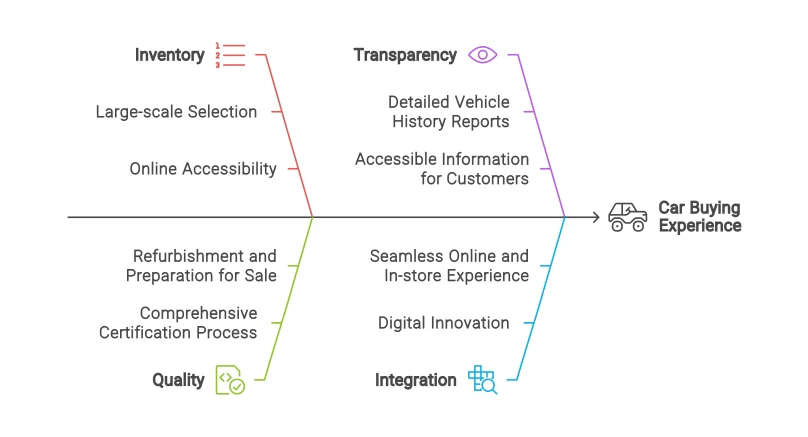
Visualize complex factors influencing customer experience with clear, concise diagrams.
Turn your text ideas into engaging visuals quickly and effectively.
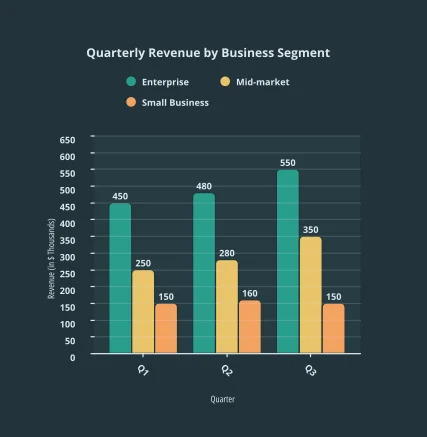
Visualize quarterly revenue trends across business segments.
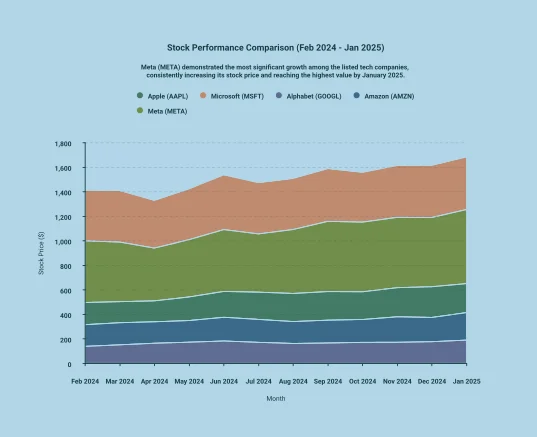
Explores stock performance comparison for major tech companies, highlighting growth trends.
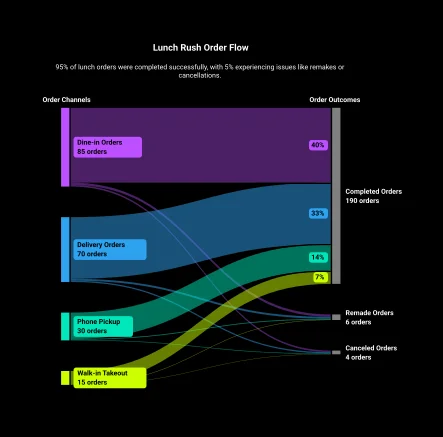
Visualize order channels and outcomes to identify bottlenecks and optimize operations.
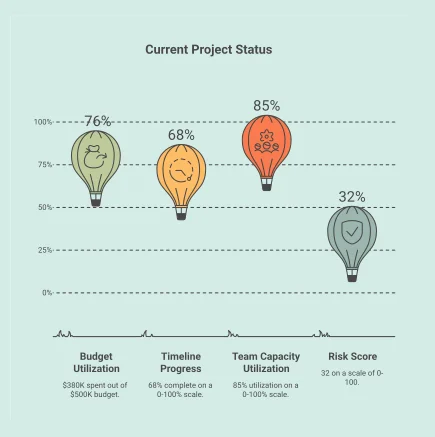
Visualize key project metrics for budget, timeline, team capacity, and risk score.
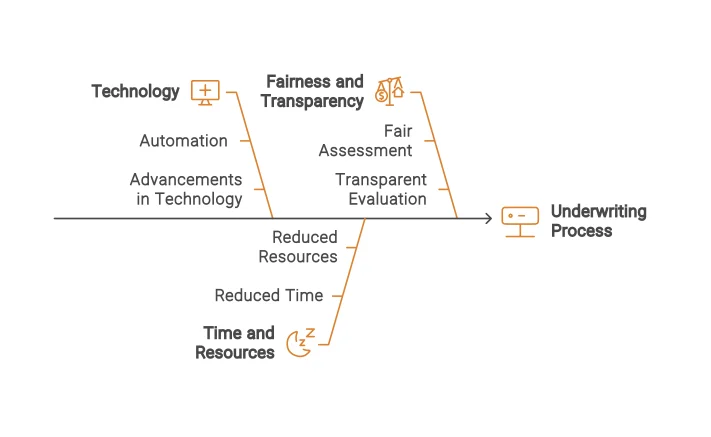
AI-generated fishbone diagram visualizing key factors influencing the underwriting process.
Napkin AI Review: Tooliverse Consensus





Based on 331 verified reviews across 4 platforms,
combined with Tooliverse's expert analysis
Napkin AI turns a finished paragraph into an editable diagram, mind map, or chart in seconds, with no prompting or design skill required. Reviewers consistently praise the simple workflow, crisp vector output, and a free tier that handles one-off projects. The catches are practical: creation and editing live in desktop browsers, credit limits confuse some free users, brand palette control is thin, and labels need a human check before anything ships.
Bottom line: One of the strongest text-to-visual tools available, turning pasted prose into editable graphics in seconds, though desktop-only access, credit limits, and thin brand palette controls will frustrate heavier users.
Napkin AI | Key Specs
- Platforms
- Web, API
- Pricing Model
- Freemium ($0-22/person/mo) See plans
- Privacy/Data Use
- No training on data if opted out, AI subprocessors barred from training
- Security
- Encrypted data See details
Wins
- •Converts raw text into professional diagrams in under ten secondsmentioned in 312 reviews
- •Features an incredibly simple workflow that requires zero design expertisementioned in 285 reviews
- •Produces high-quality vector-style outputs that remain fully editablementioned in 210 reviews
Watch-Outs
- •Restricts creation and editing features to desktop browsers onlymentioned in 84 reviews
- •Limits monthly visual exports on the free and lower-tier plansmentioned in 62 reviews
- •Lacks advanced brand customization options for specific color palettesmentioned in 55 reviews
Napkin AI Features 2026
Text-to-Visual Generation
Generates relevant visuals directly from pasted or imported text with no prompting required; you pick the best option.
Fully Editable Visuals
Change colors, reshape elements, edit labels and values, and switch visual or chart types freely after generation.
Napkin Slides (Beta)
AI presentation maker that asks about your goal and audience, builds an outline, and generates an editable deck.
Data Charts
Turns text or data into bar, line, pie, area, Gantt, Sankey, waterfall, funnel, gauge, Venn charts and tables.
Napkin AI User Reviews
Selected Reviews
"Napkin AI is different. It does something genuinely narrow and does it better than any competitor: paste structured text, and it turns that text into a clean, presentation-ready diagram in under ten seconds."
"The visual concepts it proposes usually match the structure of your argument, not just its keywords. For turning prose into consulting-style graphics, it's the best tool in the category."
"It makes visuals, not presentations. You still need a tool like PowerPoint to put the visuals into. It's a speed layer, not a full builder, which is a key distinction."
More from the Community
"I love the simplicity of being able to enter the text you'd like to use to generate imagery. It saves so much time compared to Canva for quick diagrams."
"The free version is great, but I find the credit system a bit confusing. I'm never sure how many visuals I have left for the month, and the upgrade prompts are frequent."
"The AI is smart but sometimes it misses the nuance of my industry-specific terms. Good for general concepts, needs work for niche tech diagrams."
"Output is sometimes generic or slightly off the source text, so nothing ships without a human read. No public API yet in 2026 is a bummer for our dev team."
"I love the simplicity of being able to enter the text you'd like to use to generate imagery. It saves so much time compared to Canva for quick diagrams."
"The free version is great, but I find the credit system a bit confusing. I'm never sure how many visuals I have left for the month, and the upgrade prompts are frequent."
"The AI is smart but sometimes it misses the nuance of my industry-specific terms. Good for general concepts, needs work for niche tech diagrams."
"Output is sometimes generic or slightly off the source text, so nothing ships without a human read. No public API yet in 2026 is a bummer for our dev team."
"The new Effects feature is incredible for visual communication in the classroom. Cogwheels and sticky-note boards look great and engage students much better than plain text."
"Eight months later, it's still my go-to tool. But it isn't perfect. There are frustrations with brand palette saving and resizing elements precisely."
"It's the fastest text-to-visual tool available in 2026. Not a full presentation builder, but it does its one job better than anything else I've tried."
"The new Effects feature is incredible for visual communication in the classroom. Cogwheels and sticky-note boards look great and engage students much better than plain text."
"Eight months later, it's still my go-to tool. But it isn't perfect. There are frustrations with brand palette saving and resizing elements precisely."
"It's the fastest text-to-visual tool available in 2026. Not a full presentation builder, but it does its one job better than anything else I've tried."
Napkin AI Pricing 2026
View SourceThe free tier is better than most: 500 credits weekly covers occasional diagrams, though visuals carry the vendor's branding and export stops at PNG and PDF. Plus at $9/user monthly removes the branding and adds PPT and SVG export, which is what anyone putting visuals into client decks actually needs. Pro at $22/user monthly mainly matters for heavy credit use or custom fonts and branding across a team.
Napkin AI In-Depth Review 2026

Napkin AI is a text-to-visual tool that takes pasted or imported text and generates several diagram options, including flowcharts, mind maps, and charts, with no prompt writing. It imports PPT, DOC, PDF, HTML, and Markdown, and exports PPT, PNG, PDF, and SVG, so results travel into PowerPoint, Google Slides, Keynote, Canva, or a blog post. Everything stays editable after generation. It runs in a desktop browser, and a REST API covers developers who want visuals generated inside their own apps.
What It's Like Day-to-Day
The workflow is short. You paste a passage, select it, and Napkin offers a row of visual options; you pick the one that fits. Reviewers describe the whole loop finishing in under ten seconds, and one G2 marketing lead said it "saves so much time compared to Canva for quick diagrams." Because no design decisions are required up front, people without a design background report presentable results on the first attempt, which spares the first draft of a flowchart from needing a mouse and an afternoon.
Editing is where the output stops feeling like a template.
Napkin AI Security & Compliance
Security Features
- Encrypted data
Privacy Commitments
- No model training on your data if you opt out of data sharing
- Contracts prohibit AI subprocessors from training on customer data
Napkin AI: Frequently Asked Questions (FAQs)
Does Napkin AI have a free plan?
Yes, Napkin AI has a Free plan at $0 with 500 AI credits per week, unlimited visuals editing, unlimited file import, and unlimited PNG & PDF export. Visuals carry Napkin branding.
How much does Napkin AI cost?
Napkin AI costs $9 per person/month for Plus (10,000 credits/month) and $22 per person/month for Pro (30,000 credits/month). Enterprise pricing is available by contacting the company.
What are AI credits in Napkin?
AI credits measure usage in Napkin and are spent generating visuals, at approximately 1 credit per word selected for generation. This may change for more complex outputs or advanced features.
Is there a discount for annual billing?
Yes, annual plans save 25% compared to monthly plans.
Napkin AI Integrations
| PowerPoint | Google Slides | Canva |
| Keynote | Medium | Substack |
| WordPress | Google Docs | Microsoft Word |
| Notion | Confluence | Make |
| n8n |
Napkin AI: Verified Data Sheet
| # | Label | Data Point |
|---|---|---|
| [1] | Napkin AI Consensus: 9.04/10 | Napkin AI is one of the highest-rated AI design tools in the Tooliverse index, with a consensus score of 9.04/10 across 331 verified reviews. |
| [2] | What is Napkin AI | Napkin AI is a text-to-visual platform that turns pasted text into editable diagrams, charts, mind maps, and slides. It offers a free plan, with paid plans from $9/person/month, plus a REST API. |
| [3] | Tooliverse Consensus on Napkin AI | Napkin AI turns a finished paragraph into an editable diagram, mind map, or chart in seconds, with no prompting or design skill required. Reviewers consistently praise the simple workflow, crisp vector output, and a free tier that handles one-off projects. The catches are practical: creation and editing live in desktop browsers, credit limits confuse some free users, brand palette control is thin, and labels need a human check before anything ships. |
| [4] | Napkin AI Verdict | Napkin AI bottom line: One of the strongest text-to-visual tools available, turning pasted prose into editable graphics in seconds, though desktop-only access, credit limits, and thin brand palette controls will frustrate heavier users. |
| [5] | Free: Free | Napkin AI provides a functional Free tier with 500 AI credits per week and Unlimited visuals editing, making AI tools accessible at no cost. |
| [6] | Text to diagram in under 10 seconds | Napkin AI converts raw text into professional diagrams in under ten seconds, a speed advantage cited in 312 of 331 analyzed user reviews. |
| [7] | No prompts or design skills needed | Napkin AI works directly from pasted or imported text with no prompt writing, and 285 user reviews describe a workflow that requires zero design expertise. |
| [8] | Editable vector-style output, 4 export formats | Napkin AI produces vector-style visuals that stay fully editable, with labels, values, colors, and chart types adjustable after generation, according to 210 user reviews, and exports them as PPT, PNG, PDF, or SVG. |
| [9] | Pro: $22/user/month | Napkin AI Pro gives users 30,000 AI credits per month for $22/user monthly, well beyond what the free tier allows. |
| [10] | Free tier suits one-off projects | Napkin AI offers a free tier of 500 AI credits per week with unlimited visuals editing and unlimited file import, which 195 user reviews call useful for one-off projects. |
| [11] | Desktop browsers only | Napkin AI restricts creation and editing to desktop browsers, a limitation raised in 84 user reviews. |
| [12] | Export and usage limits on lower tiers | Napkin AI caps usage on the free and lower-tier plans, with free exports limited to PNG and PDF and PPT and SVG export starting at the $9/user monthly Plus plan, according to 62 user reports. |
| [13] | Privacy: No model training on your data if you opt out of data sharing | Napkin AI privacy protections include No model training on your data if you opt out of data sharing and Contracts prohibit AI subprocessors from training on customer data. |
| [14] | Enterprise: Encrypted data | Napkin AI provides enterprise security with Encrypted data. |
| [15] | Narrow job, done better than competitors | A verified Product Hunt reviewer noted that Napkin AI "does something genuinely narrow and does it better than any competitor," turning structured text into a presentation-ready diagram in under ten seconds. |
Best Napkin AI Alternatives
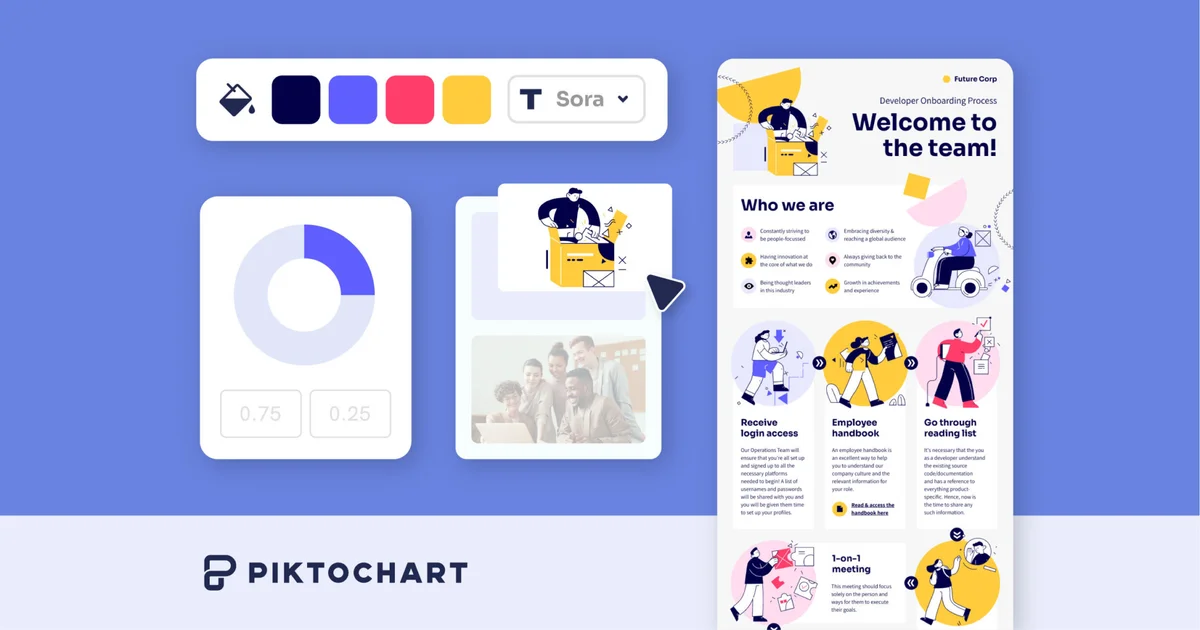
Piktochart
Turn complex ideas into on-brand infographics, presentations, and videos in seconds, no design skills needed.
Gamma
Turn your ideas into polished presentations, websites, and more almost as fast as you can think.
Beautiful.ai
Turn your ideas into visual stories that win, without the late-night formatting headaches.